Publication Date: 8/17/2026 Share Print

Previous Topic

Next Topic

Book Contents

Book Index

Library and Read & Sign Process

The Library module is a comprehensive tool designed to manage and track technical documentation, including manuals, received by the organization. It allows for efficient management of revision numbers, volumes, revision dates, and more, ensuring that all necessary information is up-to-date and easily accessible.

With workflow management functionality, users can authorize and control manuals and documentation, ensuring that they are reviewed and approved by the relevant departments before being implemented.

The Library Explorer provides a visual representation of all data within the library system, allowing for easy navigation and location of manuals and documents. Each item is registered into its correct location, along with revision information, ensuring that users can easily find the information they need.

The Manual Authorization Explorer allows departments to review items based on the steps set in the master control, with completion of each step passing the item to the next department. This ensures that all relevant parties have reviewed and approved the documentation before it is implemented.

Revisions are recorded and dispatched on the system, with different locations able to see their revision status compared to the master documents. This feature ensures that all users are aware of any changes or updates to the documentation.

The Library module also offers customers a means of communicating company memos, revision to manuals or TraxDoc, as well as company notifications with the Read & Sign feature. This allows users to provide feedback and store signature confirmation of receipt for record-keeping purposes.

In addition to tracking all manuals and revisions, the Library module also allows customers to request, track, and assign any technical documentation for Task Cards, TraxDoc, and Manuals via the Tech Pub Request feature. This feature ensures that all necessary information is easily accessible and can be assigned to the appropriate parties for efficient completion.

The following process flow is a general guide for the configuration, request, creation, and revision steps within the Library life cycle. This life cycle may vary depending on each TRAX user and their company's customized protocols.
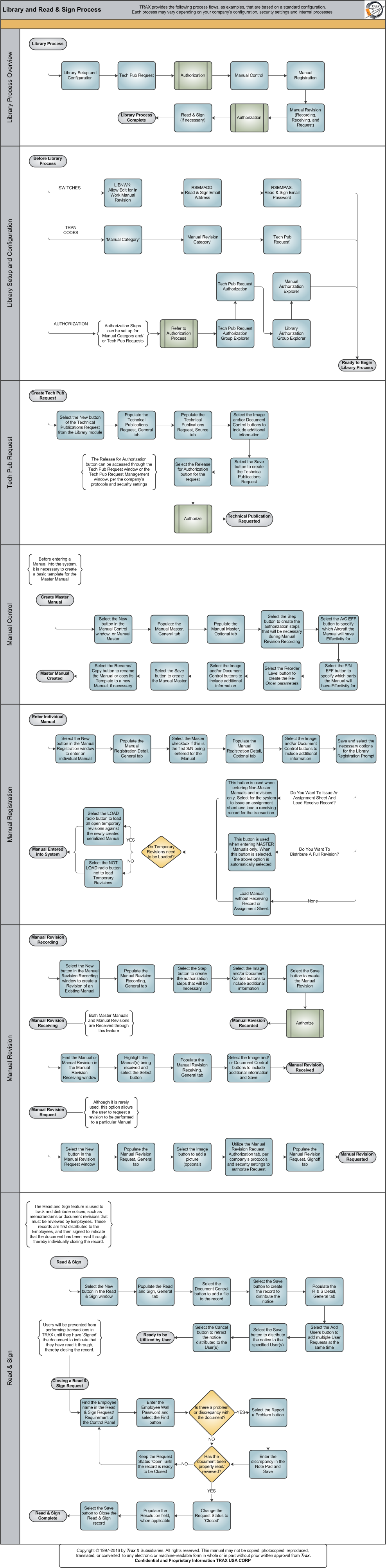
Click on the steps to see details!

Library Setup and ConfigurationTech Pub RequestAuthorization ProcessAuthorization ProcessManual ControlManual RegistrationManual RevisionRead & SignLibrary Setup and ConfigurationLIBNWKRSEMADDRSEMPASManual CategoryManual Revision CategoryTech Pub RequestAuthorization ProcessTech Pub Request AuthorizationLibrary Authorization Group ExplorerManual Authorization ExplorerTech Pub RequestTechnical Publications Request, General TabTechnical Publications Request, Source TabDocument Control and/or Image ButtonsTechnical Publications Request, General TabRelease for Authorization ButtonAuthorization ProcessTechnical Publication RequestedManual ControlManual Master, General TabManual Master, Optional TabStep ButtonA/C EFF ButtonP/N EFF ButtonRe-Order Level ButtonDocument Control and/or Image ButtonsManual Master, General TabRename/Copy ButtonMaster Manual CreatedManual RegistrationManual Registration Detail, General TabManual Registration, Optional TabDocument Control and/or Image ButtonsLibrary Registration PromptLibrary Registration PromptDo Temporary Revisions need to be Loaded?Library Registration PromptManual Entered into SystemManual RevisionManual RevisionManual RevisionManual Revision Recording, General TabStep ButtonDocument Control and/or Image ButtonsManual Revision Recording, General TabAuthorization ProcessManual Revision CompleteManual Revision Receiving, General TabManual Revision Receiving Detail, General TabDocument Control and/or Image ButtonsManual Revision CompleteManual Revision Request, General TabImage ButtonManual Revision Request, General TabManual Revision CompleteRead & SignRead & Sign, General TabDocument Control ButtonRead & Sign, General TabRead and Sign Detail, General TabAdd Users ButtonRead and Sign Detail, General TabCancel ButtonReady to be Utilized by UserClosing a Read & Sign RequestClosing a Read & Sign RequestIs there a problem or discrepancy?Report a ProblemHas the document been properly read/reviewed?Closing a Read & Sign RequestClosing a Read & Sign RequestRead & Sign Complete

The following sections are the primary elements covered in this process flow:

See Also

PROCESS FLOWS

Aircraft Actual Flight (Manual Entry) Process

Aircraft Initial P/N Load Process

Aircraft Return and Archiving Process

Aircraft Units Process

APU Process

Assembly Management

Concession Registry Process

Consigned Inventory Process

Contract Order Process

Customer Creation Process

Defect Report Process

Delete E/C and P/N Control Compliance Process

Dent Mapping Process

Employee and Skill Creation Process

Engineering Control Process

Engineering Pending Release Process

ETOPS Process

Exchange Order Out Process

Exchange Order Process

Fault Code Report Process

Flight Accumulation Process

Ground Service Equipment (GSE) Process

Helicopter Process

Importing a File Process

Interactive Planner Overview

Internal Component Repair (Shop) Process

Kit Management

Loan Order Process

Location Creation Process

Man Hours Schedule Planning Process

Managed A/C Process

MEL Process

MEL Authorization Process

Missing Parts Process

Monthly Financial Procedures

New Aircraft Process

Order Invoice Process

P/N Control - General Configuration

P/N Control - Life Limited Parts (LLP)

P/N Control - Proration Process

P/N Initial Load Process

P/N Pool Agreement Process

P/N Remove/Install Process

P/N Software Configuration

Packing and Shipping Process

Part Number Creation Process

Physical Inventory Process

Picklist and Requisition Process

Printer Setup and Configuration

Purchase Order Process

Quality Assurance Process

R/O Capability Employee Rating Process

Receiving Process

Recurrent Item Alert (Reliability) Process

Rental Order Process

Re-Order Level Process

Repair Order Process

Repair Order Following Process

Return to Stock Process

Return To Vendor Process

Sales Order Process

Scrap Process

Security Explorer Process

Service Order and Power By The Hour Process

Skill Master Process

Standard Authorization Process

Supply Chain Process

System Notification Creation Process

Task Card Creation Process

Task Card Discrepancy Process

Third Party Work Order Process

Tool Management

Training Process

Transfer Order Process

TRAX General Process Flow

TraxDoc Process

Vendor Contract Process

Vendor Creation Process

W/O Task Card Assignment and Workshop Process

Warehouse Management

Warranty Management

Work Order Process

Work Order Reservation Control Process

Work Turnover Process

Top of Page Publication Date: 8/17/2026 Share Print