
 Share
Share
 Print
Print
|
|
|
|
|


Flight Accumulation Process
The Flight Accumulation process details how flight time is added to an aircraft. The A/C initial hours/cycles are entered through the Z-Record button via the A/C Master. If the aircraft has been leased/loaned out, any time that was accumulated against the aircraft while the aircraft was leased/loaned out can be entered via the Intermediate Z-log button. From that point, flight hours will be accumulated via Actual Flights. Once all flights have been closed, all total time can be viewed via the A/C Master, A/C Flight Status tab. the user may also view a historical breakdown of the accumulated flight hours via Inventory Transaction Detail.
The Flight Accumulation process is designed to allow users to visualize the entire procedure for adding flight time to an aircraft.
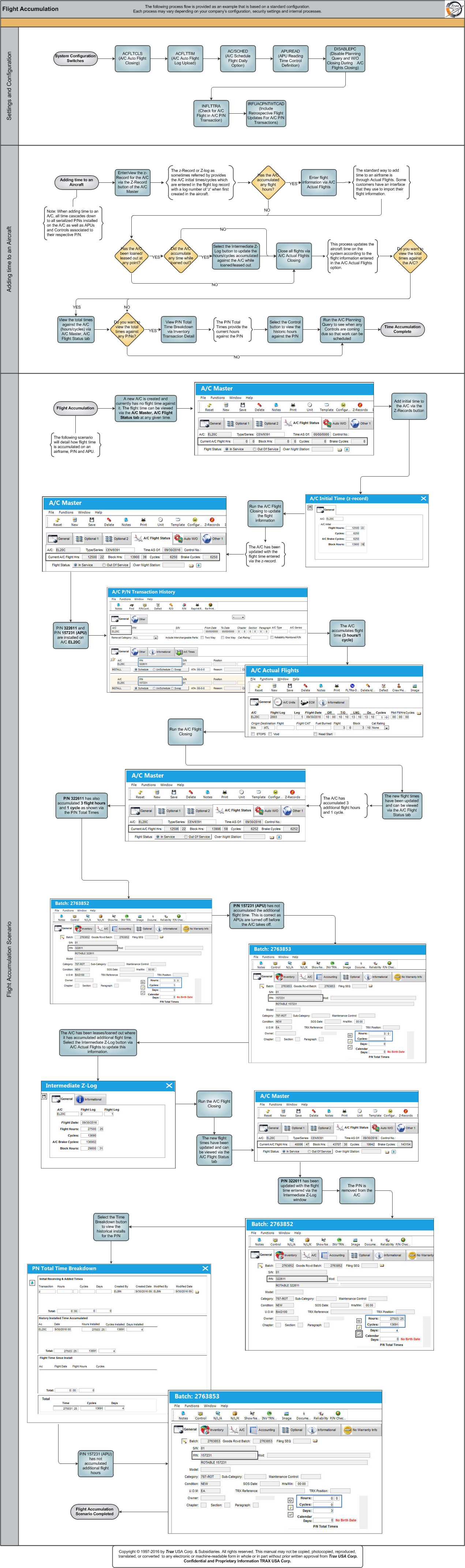
Each step in the process chart is explained in further detail throughout the following documentation. The procedural sections are broken down into the following categories:
- Flight Accumulation Settings and Configuration
- Adding Time to an Aircraft
- Flight Accumulation Scenario
Share
Print
|
©1997-2026 Trax USA Corp. All rights reserved. This manual may not be copied, photocopied, reproduced, translated, or converted to any electronic or machine-readable form, in whole or in part, without prior written approval from Trax USA Corp. |
 |