Publication Date: 8/17/2026 Share Print

Previous Topic

Next Topic

Book Contents

Book Index

Internal Component Repair (Shop) Process

The Shop module is responsible for the creation, management, and tracking of maintenance/repair work performed on parts. Internal repair capabilities are covered in the Shop module.

This work can be categorized as internal (for components owned and utilized by users) or Third Party (for components utilized by third party customers but repaired by users).

The Production module is used for work done on aircraft while the Shop module is used for work on parts.

An additional element of the Shop Work Order allows the company to analyze all time and costs involved in the work, giving a better understanding of the operation and the opportunity to improve in certain areas where cost and time are an issue.

Shop work can be planned effectively and work packs can be created quickly, avoiding labor intensive copying and sorting of check cards. Relevant information to the checks is produced along with the check pack to allow for project management of the check.

Reports detailing work requirements and zone conflicts help to organize the check effectively. Panel removal sheets cut down on the time wasted on removing/installing panels unnecessarily.

This module's Third Party capabilities give you the tools to manage customer projects, and all associated costs and charges efficiently. System invoicing is immediate and details all materials used and work performed. Miscellaneous costs can also be included by using the Additional Billing feature

Bar coding can be used for shop floor data collection, allowing for online, real time recording of carried out work. Graphical representations of each check's status can be viewed while work is in progress. Managers can see when work is ahead or behind schedule (actual versus estimates), alongside breakdowns of associated costs at a glance.

The Barcode 3 of 9 Regular font (BARCD39.ttf) must be installed in your Windows/ Fonts directory in order for you to have the ability to view barcodes (where available) in specific reports throughout the system. Please contact your System Administrator to confirm that this font has been correctly installed.

Included as part of the Shop module is the interface to your financial system, which allows complete cost control of checks and dissemination of work in progress costs against work completed.

Finally, upon completion of Shop Work Orders, completion information is fed back to other modules in the system, such as Technical Records (for component information), Engineering (completions of inspections, AD's, SB's etc.) and the Accounts interface (for costing and billing).

The (creation of the) Shop Work Order is the main option available in the Shop module and is used to create and manage the work packs for the components and aircraft.


The Internal Component Repair Process is a general guide for the configuration, creation and completion of the Shop Work Order life cycle. The following process is designed to outline all the steps required in order to create, complete and close Shop Work Orders.
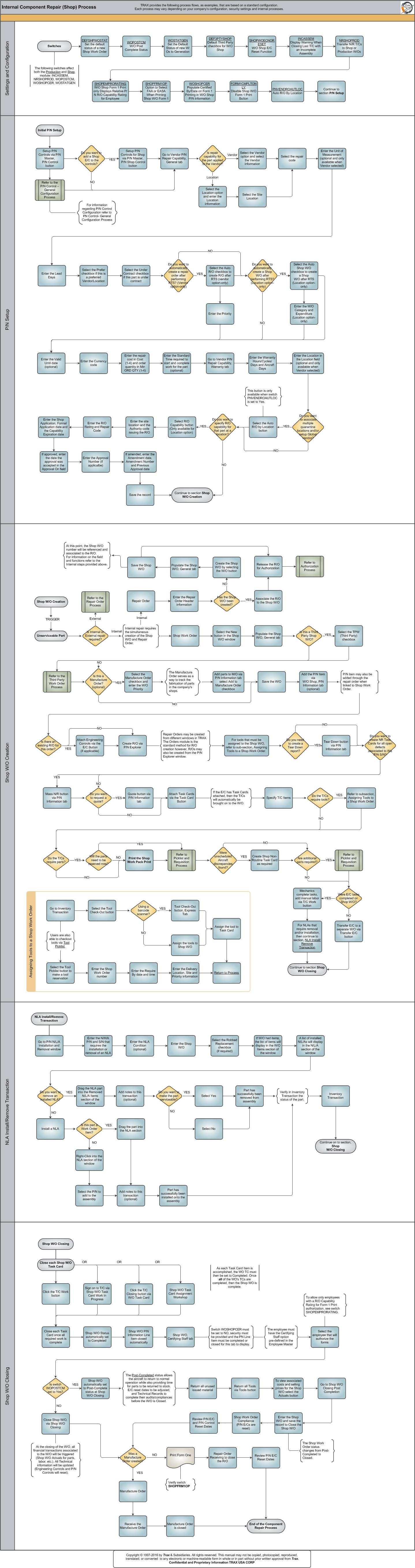
Click on the steps to see details!

Set the default status of a new Shop W/ORepair Order ProcessSubprocessesDefault Third Party checkbox for WO ShopDisable Shop WO Form 1 Print ButtonDisplay Warning When Closing Last TC with an Incomplete AssemblyTransfer NR TCs to Shop or Production WOsOption to Select FAA or EASA When Printing Shop WO Form 1WO Shop EC Reset FunctionWO Post Complete StatusPopulate Certified Set the Default Status of new WOs to GenerationVendor P/N Repair Capability, General TabUnserviceable PartShop Work OrderSelect the TPW (Third Party) checkboxSelect the Manufacture Order checkbox and enter the W/O PriorityTool Check-Out ButtonTool Check-Out button, Express TabAssign the tools to Shop W/OAdd the P/N Item via W/O Shop, P/N Information tab (optional)Tear Down button via P/N Information tabMass N/R button via P/N Information tabDo you want to create NR Task Cards for all open defects associated to this P/N S/N?Do you want to request a quote? Attach Engineering Controls via the E/C ButtonAttach Task Cards via Task Card ButtonDo the TCs require parts?Will the parts need to be reserved now?Print the Shop Work Pack PrintWere unscheduled aircraft discrepancies reported?Transfer E/C ButtonP/N NLA Installation and RemovalInstall New S/N or Fixed NLAT/C Work buttonSign on to TC via Shop WO Task Card Work In ProgressRepair OrderRepair Order Non-Routine Task CardAre additional parts  required?Were E/C tasks completed on Shop W/O?Task Card Work buttonTask Card Closing buttonShop W/O Task Card Assignment WorkshopShop W/O Status automatically set to CompletedShop W/O Certifying StaffTool Check-In button, via Inventory TransactionPrint Form OneR/O ReceivingReview P/N E/C DatesManufacture OrderManufacture Order ReceivingW/O Post-CompleteShop W/O ClosingW/O Shop Form 1 Print only Displays Relative P/N R/O Capability Rating for EmployeeServiceable PromptInventory TransactionP/N N/L/A Installation and Removal TransactionP/N N/L/A Installation and Removal TransactionP/N N/L/A Installation and Removal TransactionReview P/N E/C Reset DatesP/N Shop Control ButtonVendor P/N Repair Capability, General tabDo you want to automatically create a Shop W/O after performing RTS? (Location option-only)Select the Auto R/O checkbox to create R/O after RTS (vendor option-only)Vendor P/N Repair Capability, General tabVendor P/N Repair Capability, General tabVendor P/N Repair Capability, General tabVendor P/N Repair Capability, Warranty tabVendor P/N Repair Capability, Warranty tabDo you want to associate multiple quarantine locations and/or setup Global Vendor?Auto R/O By Location ButtonDo you want to specify R/O capability for that part at a location?P/N Control Button, via P/N Master, P/N Control buttonTool Picklist ButtonAssigning Tools to a Shop Work OrderAssigning Tools to a Shop Work OrderP/N Control - General ConfigurationAuthorization ProcessThird Party Work Order ProcessSubprocessesShop W/O CreationShop W/O ClosingInitial P/N SetupVendor P/N Repair Capability, General tabAuto RO By Location buttonVendor P/N Repair Capability, General tabVendor P/N Repair Capability, Warranty tabAuto R/O By Location buttonSelect the R/O Capability buttonSave the recordAdd parts to MOShop Work Order HeaderSelect E/C buttonSelect the Mass N/R buttonSelect the Quote buttonSelect the Task Card buttonRefer to Assigning Tools subsectionRefer to Assigning Tools subsectionWork Pack PrintCreate Shop NR TCPicklist and Requisition ProcessPicklist and Requisition ProcessSelect the Task Card Work buttonCreate R/O via P/N ExplorerNLA Install/Remove TransactionInventory TransactionInventory TransactionTask Card Closing buttonShop W/O Certifying Staff tabSelect W/O Actuals buttonShop W/O Closing Post CompletionWork Order Closing Post CompetionAuto R/O By LocationP/N N/L/A Installation and Removal

See Also

PROCESS FLOWS

Aircraft Actual Flight (Manual Entry) Process

Aircraft Initial P/N Load Process

Aircraft Return and Archiving Process

Aircraft Units Process

APU Process

Assembly Management

Concession Registry Process

Consigned Inventory Process

Contract Order Process

Customer Creation Process

Defect Report Process

Delete E/C and P/N Control Compliance Process

Dent Mapping Process

Employee and Skill Creation Process

Engineering Control Process

Engineering Pending Release Process

ETOPS Process

Exchange Order Out Process

Exchange Order Process

Fault Code Report Process

Flight Accumulation Process

Ground Service Equipment (GSE) Process

Helicopter Process

Importing a File Process

Interactive Planner Overview

Kit Management

Library and Read & Sign Process

Loan Order Process

Location Creation Process

Man Hours Schedule Planning Process

Managed A/C Process

MEL Process

MEL Authorization Process

Missing Parts Process

Monthly Financial Procedures

New Aircraft Process

Order Invoice Process

P/N Control - General Configuration

P/N Control - Life Limited Parts (LLP)

P/N Control - Proration Process

P/N Initial Load Process

P/N Pool Agreement Process

P/N Remove/Install Process

P/N Software Configuration

Packing and Shipping Process

Part Number Creation Process

Physical Inventory Process

Picklist and Requisition Process

Printer Setup and Configuration

Purchase Order Process

Quality Assurance Process

R/O Capability Employee Rating Process

Receiving Process

Recurrent Item Alert (Reliability) Process

Rental Order Process

Re-Order Level Process

Repair Order Process

Repair Order Following Process

Return to Stock Process

Return To Vendor Process

Sales Order Process

Scrap Process

Security Explorer Process

Service Order and Power By The Hour Process

Skill Master Process

Standard Authorization Process

Supply Chain Process

System Notification Creation Process

Task Card Creation Process

Task Card Discrepancy Process

Third Party Work Order Process

Tool Management

Training Process

Transfer Order Process

TRAX General Process Flow

TraxDoc Process

Vendor Contract Process

Vendor Creation Process

W/O Task Card Assignment and Workshop Process

Warehouse Management

Warranty Management

Work Order Process

Work Order Reservation Control Process

Work Turnover Process

Top of Page Publication Date: 8/17/2026 Share Print