
 Share
Share
 Print
Print
|
|
|
|
|


Vendor Contract Process

The Vendor Contract process allows customers to create Vendor Contracts for work that will be completed by a contractor. This functionality works in conjunction with the Contractor Authorization (CA) Request functionality. Once the Vendor Contract has been created, the customer can then link a Work Order to a vendor contract. The contractor can then review the scope of the work via the Work Order option. If any additional/unscheduled work is found by the contractor, he/she can then create a CA and send it to the customer. The CA will contain the Non-Routine Task Card which must then be authorized by the customer before the unscheduled work can be started.
The Vendor Contract process is designed to allow users to visualize the entire procedure for creating and utilizing a Vendor Contract.
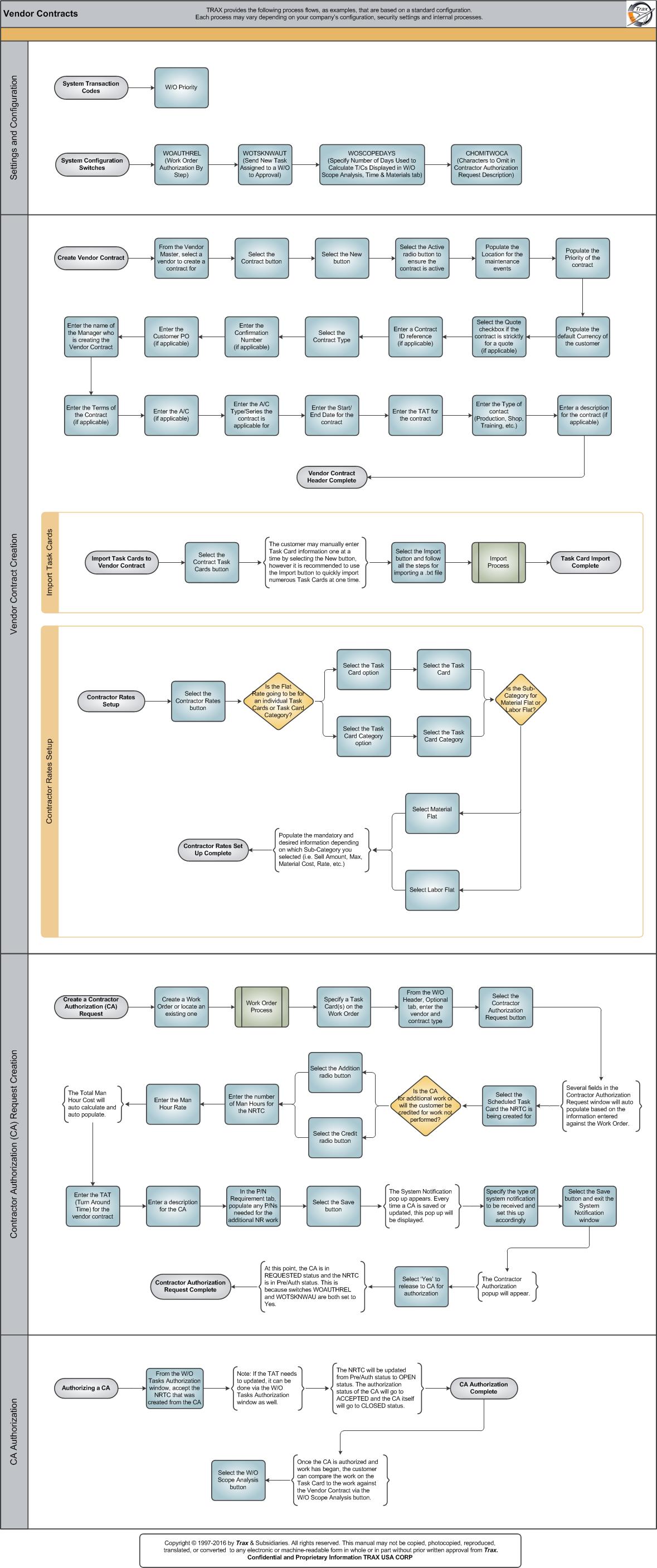
Each step in the process chart is explained in further detail throughout the following documentation. The procedural sections are broken down into the following categories:
- Vendor Contract Settings and Configuration
- Vendor Contract Creation
- Contractor Authorization (CA) Request Creation
- Contractor Authorization Request Authorization
Share
Print
|
©1997-2026 Trax USA Corp. All rights reserved. This manual may not be copied, photocopied, reproduced, translated, or converted to any electronic or machine-readable form, in whole or in part, without prior written approval from Trax USA Corp. |
 |