
 Share
Share
 Print
Print
|
|
|
|
|


P/N Control - General Configuration
P/N Controls are set up in the Settings module via the P/N Master and are to provide the means of keeping track of component times. Within the system, there is no limit to the number of controls a user can set up, each with its own hard limits.
The P/N Control  button allows users to set multiple Time Controls on parts. These Time Controls will apply to each individual unit for the P/N on the system. Time Since New, Time Before Overhaul, Time Since Last Visit, Scrap Life, Weight Check, etc., can all be applied to the P/N. The applicable Time Controls can be set-up in the System Transaction Code option. The system will track each control from setup. When a part is received into the system, these Time Controls will be available for update.
The P/N Control window will display any controls that are already set up. For most Serialized items that are tracked on the aircraft, it is a good idea to have at least TSN and TSO controls against them. Other controls such as SCRAP, TEST, BENCH CHECK, HYDROSTATIC TEST, can be set up as required. Users can create an unlimited number of P/N Control combinations to customize as required.
At this level, when users apply a Control to a P/N, it will apply to every Serial Number on the system (and every new one that arrives). If the limitation is changed here, then again, it will change every limitation for that P/N on the system.
For Hard Time Control of the Serial Numbers, a Schedule can be entered for the control; this can be one or many parameters depending on the requirement. These will be used in the A/C Planning Query [Planning/ Query/ A/C Planning Query] to calculate when the part is due for removal (if fitted to an aircraft) or by P/N Control Query (for Repairs).
Time Controls can include any of four factors: the Control (TSN, TSO, etc.), the A/C, the Position and the NHA. All factors need not be included in every control, however the combination of factors that can be created must maintain hierarchy.
Possible combinations (in hierarchical Order) are as follows.
Control (TSN, TSO, etc.)
Control + A/C
Control + Position
Control + A/C + Position
Control + NHA
The hierarchy is broken down by default Control and the above mentioned combinations depending of the installed location of the P/N.
The P/N Control - General Configuration process is designed to allow users to visualize the entire procedure for creating a Part Number Control.
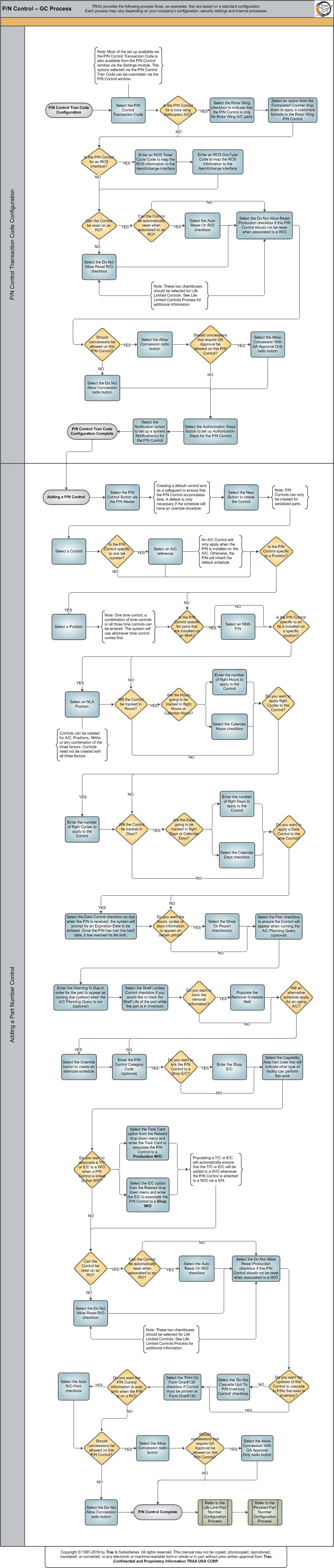
Each step in the process chart is explained in further detail throughout the following documentation. The procedural sections are broken down into the following categories:
Share
Print
|
©1997-2026 Trax USA Corp. All rights reserved. This manual may not be copied, photocopied, reproduced, translated, or converted to any electronic or machine-readable form, in whole or in part, without prior written approval from Trax USA Corp. |
 |