Publication Date: 8/17/2026 Share Print

Previous Topic

Next Topic

Book Contents

Book Index

Interactive Planner Overview

The Aircraft Planning Query feature allows for the forecast of aircraft maintenance along with the associated material, manpower, and cost requirements. Essentially, maintenance events are threefold in nature:

  1. Scheduled/Planned Maintenance events, such as mandatory Engineering Controls (AD, Checks, SB, etc.), P/N Controls, (TSO, CSO, etc.) and Deferred Defects (M.E.L., Watch Items).
  2. Optional Maintenance Events, such as Engineering Modifications and company convenience items (fleet campaigns).
  3. Unscheduled Maintenance (Open non-deferred defect reports, non-routine task cards).

Note: Unscheduled Maintenance items are not included as part of the A/C Planning Query. These are the defect reports located during line maintenance checks and planned maintenance (overnights or checks). Defect Reports will not become part of planning until the Defect is Deferred.

For planners to successfully forecast maintenance for aircraft with the greatest possible accuracy, input from both of the above is needed. This way, Work Orders will contain the maintenance tasks that best serve the needs of the aircraft.

The Interactive Planner provides nine different sections to view scheduled and unscheduled work with the capability of editing and creating work to be planned based on various planning element details.

The following is a general guide for the generation and utilization of the Interactive Planner. This life cycle varies depending on each TRAX user and their company's customized protocols, and can be conducted in any necessary manner.
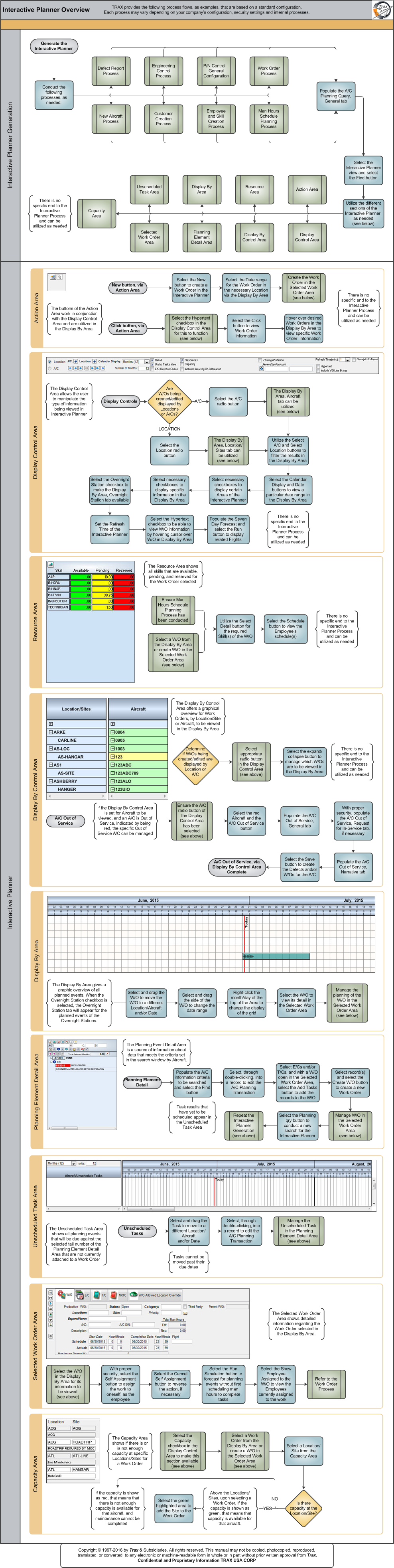
Click on the steps to see details!

Defect Report ProcessNew Aircraft ProcessEngineering Control ProcessCustomer Creation ProcessP/N Control - General ConfigurationEmployee and Skill Creation ProcessWork Order ProcessMan Hours Schedule Planning ProcessA/C Planning Query Search Criteria, General TabA/C Planning Query Search Criteria, General TabAction Area, via Interactive PlannerDisplay Control Area, via Interactive PlannerResource Area, via Interactive PlannerDisplay By Control Area, via Interactive PlannerDisplay By Area, via Interacive PlannerPlanning Element Detail Area, via Interactive PlannerUnscheduled Task Area, via Interactive PlannerSelected Work Order Area, via Interactive PlannerCapacity Area, via Interactive PlannerNew Button, via Interactive PlannerNew Button, via Interactive PlannerSelected Work Order Area, via Interactive PlannerClick Button, via Interactive PlannerDisplay Control Area, via Interactive PlannerClick Button, via Interactive PlannerAction Area, via Interactive PlannerDisplay Control Area, via Interactive PlannerDisplay Control Area, via Interactive PlannerDisplay Control Area, via Interactive PlannerDisplay By Area, via Interactive PlannerDisplay By Area, via Interactive PlannerDisplay Control Area, via Interactive PlannerDisplay Control Area, via Interactive PlannerDisplay Control Area, via Interactive PlannerDisplay Control Area, via Interactive PlannerSeven Day ForecastResource Area, via Interactive PlannerMan Hours Schedule Planning ProcessDisplay By Area, via Interactive PlannerSelect Detail ButtonResource Area, via Interactive PlannerDisplay By Control Area, via Interactive PlannerDisplay Control Area, via Interactive PlannerDisplay By Control Area, via Interactive PlannerDisplay By Control Area, via Interactive PlannerDisplay Control Area, via Interactive PlannerDisplay By Control Area, via Interactive PlannerDisplay By Control Area, via Interactive PlannerDisplay By Area, via Interactive PlannerDisplay By Area, via Interactive PlannerSelected Work Order Area, via Interactive PlannerPlanning Element Detail Area, via Interactive PlannerPlanning Element Detail Area, via Interactive PlannerFind Button, via Planning Element DetailPlanning Element Detail Area, via Interactive PlannerAdd Tasks Button, via Planning Element DetailCreate Work Order Button, via Planning Element DetailSelected Work Order Area, via Interactive PlannerPlanning Query Button, via Planning Element DetailInteractive Planner GenerationInteractive Planner GenerationUnscheduled Task Area, via Interactive PlannerUnscheduled Task Area, via Interactive PlannerUnscheduled Task Area, via Interactive PlannerPlanning Element Detail Area, via Interactive PlannerSelected Work Order Area, via Interactive PlannerDisplay By Area, via Interactive PlannerSelf Assignment ButtonCancel Self Assignment ButtonRun Simulation Button, via Interactive PlannerShow Employees Assigned to the W/O ButtonWork Order ProcessCapacity Area, via Intercative PlannerDisplay Control Area, via Interactive PlannerDisplay By Area, via Interactive PlannerCapacity Area, via Interactive PlannerCapacity Area, via Interactive Planner

The following sections are the primary elements covered in this process flow:

See Also

PROCESS FLOWS

Aircraft Actual Flight (Manual Entry) Process

Aircraft Initial P/N Load Process

Aircraft Return and Archiving Process

Aircraft Units Process

APU Process

Assembly Management

Concession Registry Process

Consigned Inventory Process

Contract Order Process

Customer Creation Process

Defect Report Process

Delete E/C and P/N Control Compliance Process

Dent Mapping Process

Employee and Skill Creation Process

Engineering Control Process

Engineering Pending Release Process

ETOPS Process

Exchange Order Out Process

Exchange Order Process

Fault Code Report Process

Flight Accumulation Process

Ground Service Equipment (GSE) Process

Helicopter Process

Importing a File Process

Internal Component Repair (Shop) Process

Kit Management

Library and Read & Sign Process

Loan Order Process

Location Creation Process

Man Hours Schedule Planning Process

Managed A/C Process

MEL Process

MEL Authorization Process

Missing Parts Process

Monthly Financial Procedures

New Aircraft Process

Order Invoice Process

P/N Control - General Configuration

P/N Control - Life Limited Parts (LLP)

P/N Control - Proration Process

P/N Initial Load Process

P/N Pool Agreement Process

P/N Remove/Install Process

P/N Software Configuration

Packing and Shipping Process

Part Number Creation Process

Physical Inventory Process

Picklist and Requisition Process

Printer Setup and Configuration

Purchase Order Process

Quality Assurance Process

R/O Capability Employee Rating Process

Receiving Process

Recurrent Item Alert (Reliability) Process

Rental Order Process

Re-Order Level Process

Repair Order Process

Repair Order Following Process

Return to Stock Process

Return To Vendor Process

Sales Order Process

Scrap Process

Security Explorer Process

Service Order and Power By The Hour Process

Skill Master Process

Standard Authorization Process

Supply Chain Process

System Notification Creation Process

Task Card Creation Process

Task Card Discrepancy Process

Third Party Work Order Process

Tool Management

Training Process

Transfer Order Process

TRAX General Process Flow

TraxDoc Process

Vendor Contract Process

Vendor Creation Process

W/O Task Card Assignment and Workshop Process

Warehouse Management

Warranty Management

Work Order Process

Work Order Reservation Control Process

Work Turnover Process

Top of Page Publication Date: 8/17/2026 Share Print