
 Share
Share
 Print
Print
|
|
|
|
|


Interactive Planner
The Aircraft Planning Query feature allows for the forecast of aircraft maintenance along with the associated material, manpower, and cost requirements. For planners to successfully forecast maintenance for aircraft with the greatest possible accuracy, input from both scheduled and unscheduled maintenance is needed. This way, Work Orders will contain the maintenance tasks that best serve the needs of the aircraft. The Interactive Planner provides nine different sections to view scheduled and unscheduled work with the capability of editing and creating work to be planned based on various planning element details.
The following is the basic life cycle of the Interactive Planner, particularly the nine different options that can be utilized, as needed:
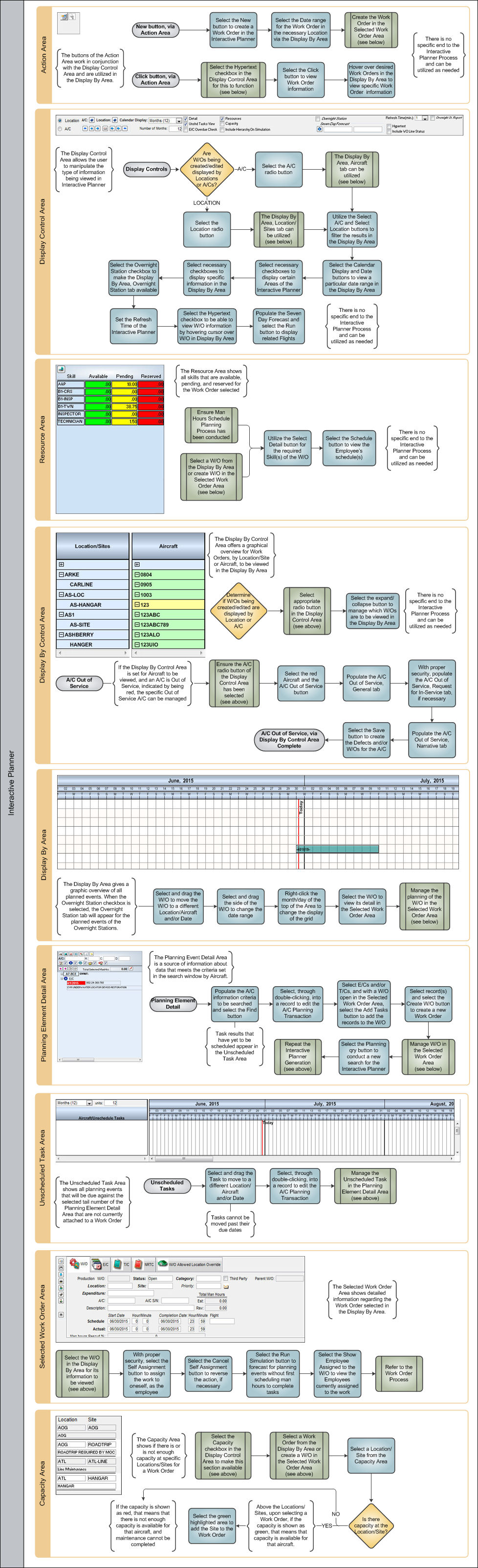
After the various processes have been conducted and the specifications of the A/C Planning Query have been made, the different sections of the Interactive Planner can be utilized, as needed.
These sections include the following:
- Action Area
- Display Control Area
- Resource Area
- Display By Control Area
- Display By Area
- Planning Element Detail Area
- Unscheduled Task Area
- Selected Work Order Area
- Capacity Area
Share
Print
|
©1997-2026 Trax USA Corp. All rights reserved. This manual may not be copied, photocopied, reproduced, translated, or converted to any electronic or machine-readable form, in whole or in part, without prior written approval from Trax USA Corp. |
 |