
 Share
Share
 Print
Print
|
|
|
|
|


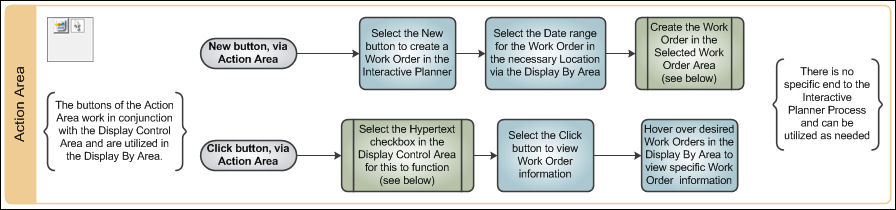
The Action Area offers multiple actions that can be performed with the displayed data.

Please refer to the Interactive Planner View section of this Manual to see where the Action Area is located on the Interactive Planner View window.
Within the Action Area are two buttons:
Select the action to be performed, and select the respective W/O as displayed in the Display By Area.
Share
Print
|
©1997-2026 Trax USA Corp. All rights reserved. This manual may not be copied, photocopied, reproduced, translated, or converted to any electronic or machine-readable form, in whole or in part, without prior written approval from Trax USA Corp. |
 |