Publication Date: 8/17/2026 Share Print

Previous Topic

Next Topic

Book Contents

Book Index

Recurrent Item Alert (Reliability) Process

The Reliability module is used to provide statistical data regarding the reliability of a specific aircraft or specific part numbers. Reliability reports can be produced as per company requirements and industry standards. Tracking of recurrent items can also be accomplished.

A/Cs and P/Ns must be properly set up in order for the Alert to appear in the appropriate Recurrent Alert Explorers.

The following process flow is a general guide for the configuration, creation, and management of the Recurrent Alert Item life cycle. This life cycle may vary depending on each TRAX user and their company's customized protocols.
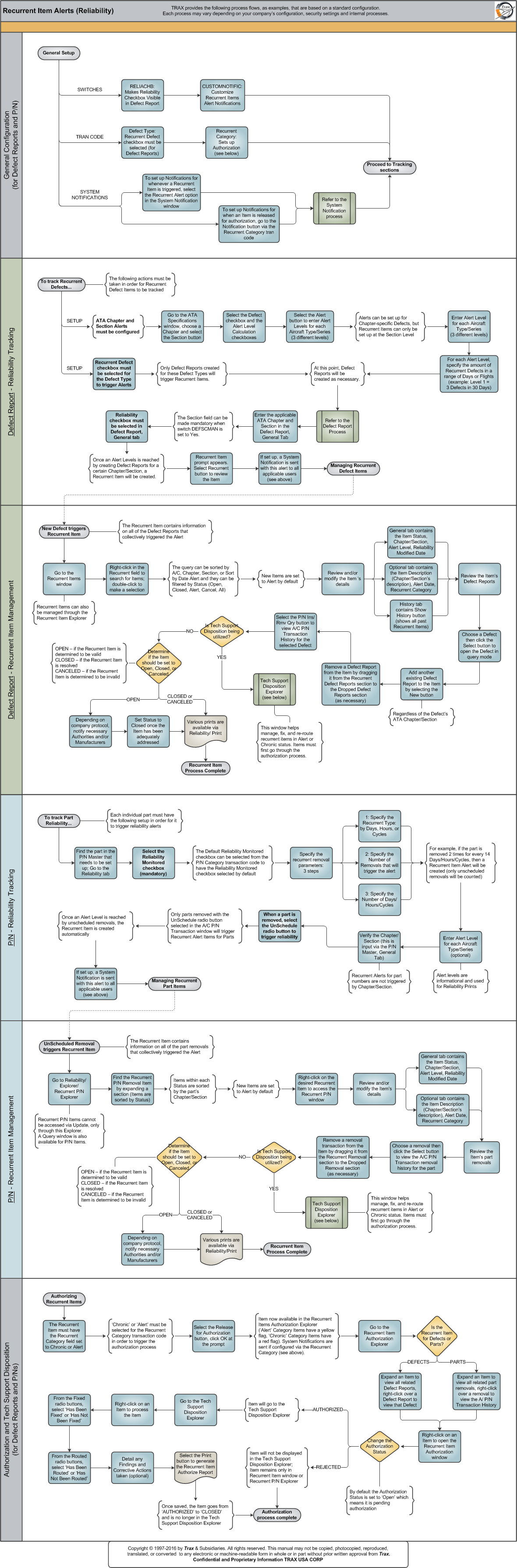

Click on the steps to see details!

CUSTOMNOTIFICRecurrent CategorySetting up Recurrent Item NotificationsSetting up Recurrent Item NotificationsSystem Notification Creation ProcessRELIACHBDefect TypeATA SpecificationsSection Button, via ATA ChapterAlert Button, via ATA SectionAlert Button, via ATA SectionSetting Up Defect Type Tran Code for ReliabilitySetting Up Alert Levels for ATA Chapter/SectionsCreating Defect Reports for ReliabilityDEFSCMANCreating Defect Reports for ReliabilityRecurrent Alert Button, via the Defect ReportSetting Up Recurrent Item NotificationsDefect Report ProcessRecurrent ItemsRecurrent Item Search WindowRecurrent Items, General TabRecurrent Items, Optional TabRecurrent Items, History TabManaging an Item's DefectsRecurrent Items New Item ButtonP/N Install/Removal Query Button, via Defect ReportManaging an Item's DefectsDeciding to use the Tech Support DispositionRecurrent Item ExplorerP/N Master, Reliability TabDefault Reliability Monitored Checkbox, via P/N CategoryP/N Master, General TabP/N Master, Reliability TabP/N Master, Reliability TabRemove Only, via A/C P/N TransactionSetting Up Recurrent Item NotificationsRecurrent P/N ExplorerRecurrent P/N, General TabRecurrent P/N, Optional TabRemoval Transactions, via Recurrent P/NRemoval Transactions, via Recurrent P/NDeciding to use the Tech Support DispositionRecurrent Item Authorization ExplorerAuthorization of Recurrent ItemsAuthorization of Recurrent ItemsTech Support Disposition ExplorerTech Support Disposition ExplorerPrint Red Letters and Yellow LettersGeneral Configuration (for Defect Reports and P/Ns)Defect Report - Reliability TrackingDefect Report - Recurrent Item ManagementP/N - Reliability TrackingP/N - Recurrent Item ManagementAuthorization and Tech Support Disposition

logo_12_5 small Note: In Trax V12.5, the System Notification 'Part Removal Recurrent Notification' was added where, based on a parts recurrent levels setup in the P/N Master Reliability tab, a notification will be sent that includes the P/N and the registration of the A/C the part was removed from.

See Also

PROCESS FLOWS

Aircraft Actual Flight (Manual Entry) Process

Aircraft Initial P/N Load Process

Aircraft Return and Archiving Process

Aircraft Units Process

APU Process

Assembly Management

Concession Registry Process

Consigned Inventory Process

Contract Order Process

Customer Creation Process

Defect Report Process

Delete E/C and P/N Control Compliance Process

Dent Mapping Process

Employee and Skill Creation Process

Engineering Control Process

Engineering Pending Release Process

ETOPS Process

Exchange Order Out Process

Exchange Order Process

Fault Code Report Process

Flight Accumulation Process

Ground Service Equipment (GSE) Process

Helicopter Process

Importing a File Process

Interactive Planner Overview

Internal Component Repair (Shop) Process

Kit Management

Library and Read & Sign Process

Loan Order Process

Location Creation Process

Man Hours Schedule Planning Process

Managed A/C Process

MEL Process

MEL Authorization Process

Missing Parts Process

Monthly Financial Procedures

New Aircraft Process

Order Invoice Process

P/N Control - General Configuration

P/N Control - Life Limited Parts (LLP)

P/N Control - Proration Process

P/N Initial Load Process

P/N Pool Agreement Process

P/N Remove/Install Process

P/N Software Configuration

Packing and Shipping Process

Part Number Creation Process

Physical Inventory Process

Picklist and Requisition Process

Printer Setup and Configuration

Purchase Order Process

Quality Assurance Process

R/O Capability Employee Rating Process

Receiving Process

Rental Order Process

Re-Order Level Process

Repair Order Process

Repair Order Following Process

Return to Stock Process

Return To Vendor Process

Sales Order Process

Scrap Process

Security Explorer Process

Service Order and Power By The Hour Process

Skill Master Process

Standard Authorization Process

Supply Chain Process

System Notification Creation Process

Task Card Creation Process

Task Card Discrepancy Process

Third Party Work Order Process

Tool Management

Training Process

Transfer Order Process

TRAX General Process Flow

TraxDoc Process

Vendor Contract Process

Vendor Creation Process

W/O Task Card Assignment and Workshop Process

Warehouse Management

Warranty Management

Work Order Process

Work Order Reservation Control Process

Work Turnover Process

Top of Page Publication Date: 8/17/2026 Share Print