
 Share
Share
 Print
Print
|
|
|
|
|


Creating Engineering Controls
Creating Engineering Controls (E/Cs) allows the user to build and track a maintenance program on airframes and components, including Airworthiness Directive (AD) and Service Bulletin (SB), for manufacturer and regulatory requirements.
The creation of E/Cs can be completed either manually through the Engineering module or automatically through the TraxDoc module. There are numerous ways to configure and set up E/Cs and all their relative information; critical items include the E/Cs Effectivity, Schedule, and Schedule Control By information.
Once E/Cs have been created and linked to their Task Card work instructions, the Task Cards can then be added to Work Orders to accomplish the required tasks.
The following is the basic process to set up a new Engineering Control:
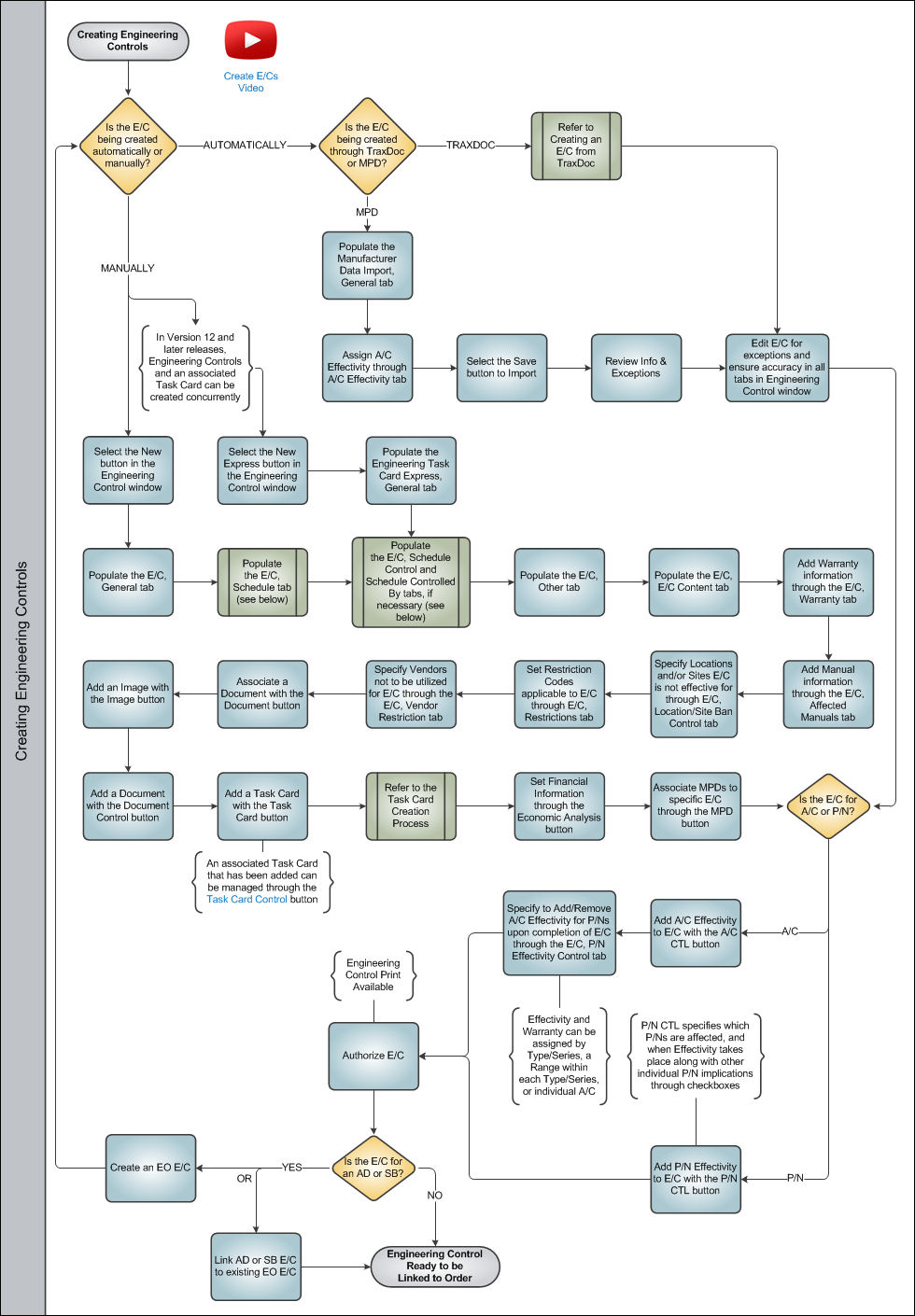
Once an Engineering Control goes through this basic life cycle, and is authorized per the company's operating procedures, the user is ready to move on to Engineering Control Linking and Compliance.
Share
Print
|
©1997-2026 Trax USA Corp. All rights reserved. This manual may not be copied, photocopied, reproduced, translated, or converted to any electronic or machine-readable form, in whole or in part, without prior written approval from Trax USA Corp. |
 |