
 Share
Share
 Print
Print
|
|
|
|
|


Bin
The Bin Master is used to create all of the Master Bin profiles in the system. When entering a Bin number in any transaction, the system will check to see that the Bin number exists in the master file. This prevents erroneous Bins from being entered into the system. Run the option. At the bottom of the window, all the bins defined in the system will appear. To only see information related to a particular location or bin range, use the Filter function. Right click on the data area.
This update window is also available in query mode where users can view the records provided in this window but cannot create new records or edit existing data. Refer to this module's Query menu.
 Bin Master Layout:
The Bin Master window displays a detailed list of all locations with related quarantine locations and the number of bins for that location. Select into a location to update bin related information.
The window is split into a header where each Location is listed with basic Bin information, followed by a detail window with all Bin details for the selected Location.
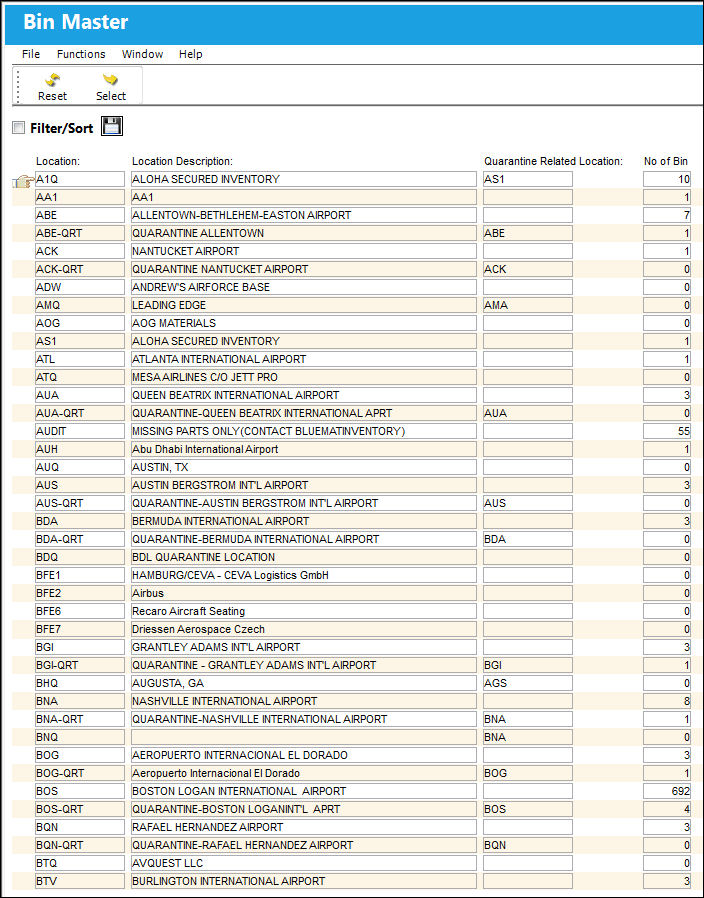
The following information/options are available in this window:
_____________________________________________________________________________________
Location
The Location for maintenance events, inventory stores, orders, transactions, or training events.
Location Description
The description of the Location
Quarantine Related Location
The quarantine location linked to this location.
No of Bin
The number of bins for the specified location.
_____________________________________________________________________________________
 The Filter/Sort option is included in the Bin Master window.
Upon opening a record through the Select  button, the user is taken to the Bin Master Detail, to which the following tabs and buttons are available.
Bin Master Tabs |
Bin Master Buttons |
|---|---|
Print Multi buttons |
 Reset button
 New button
 Save button
 Delete button


 Share
Print
Share
Print
|
©1997-2026 Trax USA Corp. All rights reserved. This manual may not be copied, photocopied, reproduced, translated, or converted to any electronic or machine-readable form, in whole or in part, without prior written approval from Trax USA Corp. |
 |