
 Share
Share
 Print
Print
|
|
|
|
|


Bin Master, General Tab
Select the New  button to create a new bin.
To edit an existing file, select the file listed at the bottom of the screen with the cursor. TRAX displays the following:
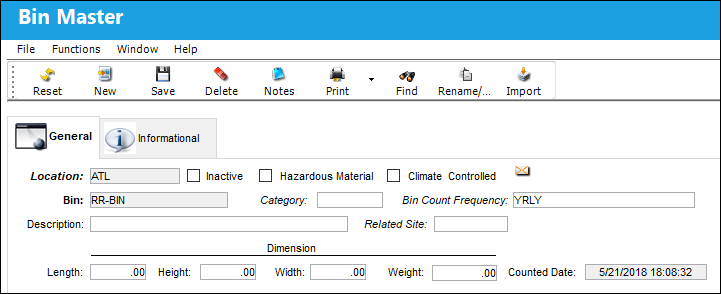
The following information/options are available in this window:
_____________________________________________________________________________________
Location
The Location for maintenance events, inventory stores, orders, transactions, or training events.
Inactive
Select this checkbox to place the Bin in Inactive Status.
Hazardous Material checkbox
Select this checkbox to classify this bin as a hazardous material bin. The bin must be set up as a hazardous material bin in order for the system to validate a hazardous part being received/transferred into a hazardous material bin. If the bin is not set up correctly, the system will display a hard warning. For additional information on how to set up a hazardous bin, refer to Switch  BINCATLINKPNCAT.
Climate Controlled checkbox
Select this checkbox to classify this bin as a climate controlled bin. The bin must be set up as a climate controlled bin in order for the system to validate a climate controlled part being received/transferred into a climate controlled bin. If the bin is not set up correctly, the system will display a hard warning. For additional information on how to set up a climate controlled bin, refer to Switch BINCATLINKPNCAT.
Bin
The specific storage bin within the inventory location.
Category
The Bin category.
When Settings Switch BINCATLINKPNCAT is set to Yes, the BIN/CATEGORY transaction code is linked to the PNCATEGORY transaction code. Parts that contain a certain Part Category can only be placed in Bins that have the same P/N Category Transaction type (i.e. Serialized, Consumable, etc.). When set to No, the Bin Category is not linked to the P/N Category. For detailed information, refer to Switch BINCATLINKPNCAT.
Bin Count Frequency
The frequency for which the bin count will be conducted. For more information, refer to the Bin Count Frequency, via the Settings Transaction Codes Manual.
Description
The description of the bin.
Related Site
Allows users to link a Location Bin with a Site from the same Location.
Dimension (Length, Height, Width, Weight)
The physical dimensions of the bin (length, height, width, weight).
Counted Date
The date the bin was last counted. This is updated automatically from the physical inventory count.
_____________________________________________________________________________________
When a physical inventory count is run on the system, the date that the bin was checked is updated automatically.
Share
Print
|
©1997-2026 Trax USA Corp. All rights reserved. This manual may not be copied, photocopied, reproduced, translated, or converted to any electronic or machine-readable form, in whole or in part, without prior written approval from Trax USA Corp. |
 |