
 Share
Share
 Print
Print
|
|
|
|
|


How to Create a File for Export with Defect Type Codes
The Aircraft Logbook Record contains one File Node called DOC which is mandatory. There are only four possible values for the File Node DOC: Pilot Log (PL), Maintenance Log (ML), Cabin Log (CL), and Cargo Defect Log (CD).
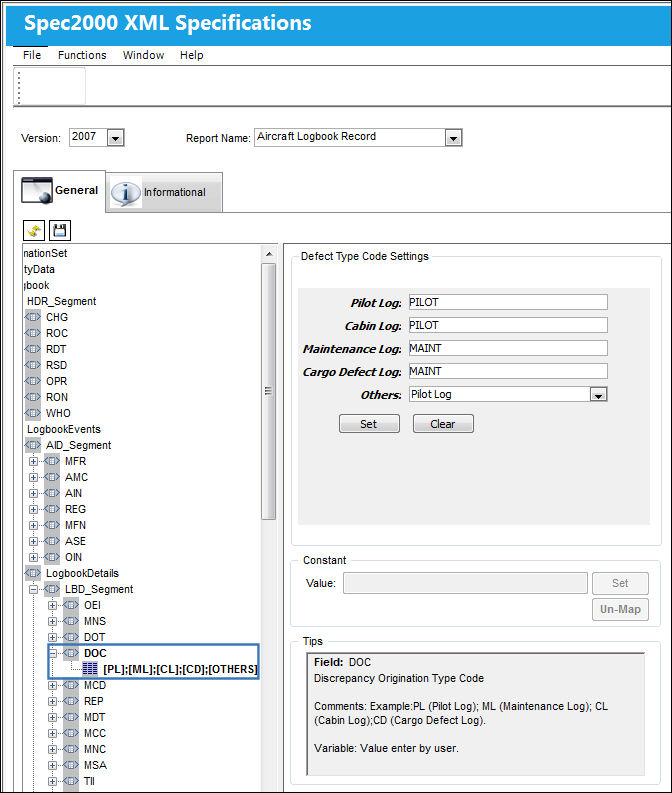
The following information/options are available in this window:
_____________________________________________________________________________________
Pilot Log
The Defect Type(s) which represents Aircraft Log Records reported by the pilot.
Cabin Log
The Defect Types(s) which represents Cabin Logs reported by the crew.
Maintenance Log
The Defect Types(s) which represents Maintenance Logs reported by a mechanic.
Cargo Defect log
The Defect Types(s) which represents Cargo Defect Logs reported by a mechanic.
Others drop down
All other Defect Types not specifically classified in any of the above Log Fields will be defaulted as an Others classification. Select one of the four possible DOC Log values where these Defect Types will be exported.
Constant Value
This option allows the user to define a constant value for data that is continuous.
This field is not accessible for the Defect Type Code Settings feature.
Tips
This option provides basic Spec2000 Chapter 11 field definitions for the end user (i.e. The meaning of the selected Node field and any pre-defined values are as follows: PL (Pilot Log), CL (Cabin Log), etc.).
_____________________________________________________________________________________
Right click in any of the above Log Fields. The following drop down selection will appear containing the Defect Type as defined in the System Transaction Codes.
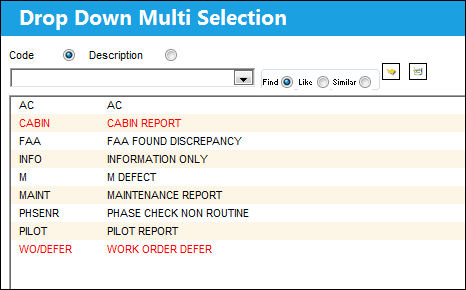
Select desired Defect Type(s) for the specific Log Field. Selected fields will become highlighted in blue. Select the Select  button.
Repeat this step for all required Log Fields.
Highlighted selections will appear in the following mandatory fields:
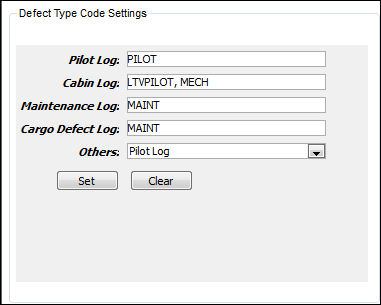
Select the Set  button to apply the Defect Type Code Settings to the report:
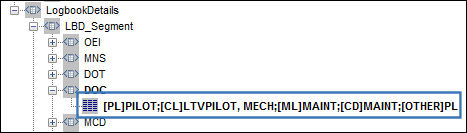
Select the Clear  to clear the Defect Type Code Settings.
Select the Save  button to save the Defect Type Code Settings.
Select the Reset  button to clear the history and/or re-define Defect Type Code Settings Export Files.
Once the Defect Type Code Settings are defined in the Spec2000 XML Specifications, the user may run the C Reliability Export File from the Reliability Module. For more information on how to run an Export file, please refer to the Spec2000 Reliability Exports section of the Reliability Manual.
Share
Print
|
©1997-2026 Trax USA Corp. All rights reserved. This manual may not be copied, photocopied, reproduced, translated, or converted to any electronic or machine-readable form, in whole or in part, without prior written approval from Trax USA Corp. |
 |