Download Online Help Print

Previous Topic

Next Topic

Book Contents

Book Index

DOCNO - Set Default Path in Config Other Field And Determine Next Sequence Number for Documents

Set Default Path in Config Other Field And Determine Next Sequence Number for Documents

Affected Window: System


Switch Set to Yes:

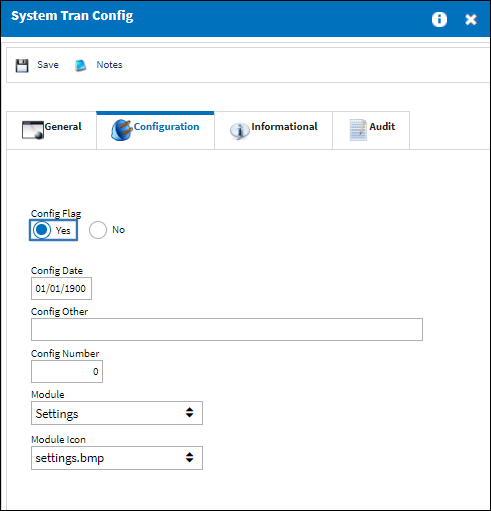
When set to Yes, the user can default the path of a document file being attached to an E/C through specification in the Config Other field of the switch.

eMRO_Settings_Yes


From an E/C, the Document Control but_document_ctl_sm button is selected. After selecting the New but_new_small button, the Select Document File window automatically opens up to the path set in the Config Other field of the switch.


Switch Set to No:

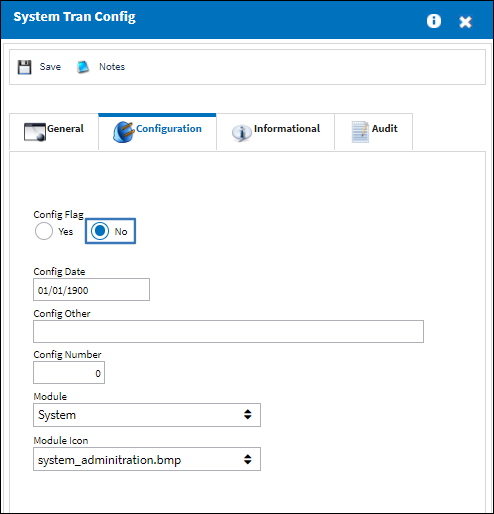
When set to No, there is no default path for a document file being attached to an E/C.

eMRO_SystemAdministration_No


From an E/C, the Document Control but_document_ctl_sm button is selected. With the switch set to No, after selecting the New but_new_small button, the Select Document File window opens up, but not to any particular path.

Note: Additionally, the Config Number field determines the next sequence number for documents. The start number is set at implementation.

See Also

System Administration Switches

AMYUNIPAPERSIZE - Default Paper Size for Amyuni Printers

BATCH - Default Paper Size for Amyuni Printers

BLOB - BLOB Next Sequence Number

BLOBSIZE - Specify File Size for BLOB (in Kilobytes)

CHECKPWRDHIST - Check Password History to Validate Against Recently Used Passwords

CONVPATH - Conversion Path

DOCEXE - Default path to External Document Management System program

DROPLIMIT - Number of Records in Drop Down Windows

EMAILDRV - E-Mail Print Driver Format

EMAILSEQ - Email Attachment Number Next SEQ

ESAVEPTH - Default Path to Save E-Mail Attachments

HELPFILE - Link Help File Path to Help Button

IMGNODEL - Images, Do Not Automatically Delete

INTRFSQL - Tracks the Date the Last Time the Interface SQL was Applied

JEWIPTRN - J/E Transaction Number Sequence

MEMREST - Recover Memory on Control Panel Activate

NOTEOVR - Allow Notes Override/ Modification By All Other Users

NOTES - Notes Next Sequence Number

NOTESTIMER - Cancel the Notification if there are New/Unread Notes in the Inbox

ORDRRCDP - Order Receiving Discrepancy Transaction

PDFMERGECOMMAND - Execute Batch File Using OS Shellexecute Command in PDF Merge

POPUPMSG - Notes Pop-Up Message Notification Instead of Audio Notification

PPREVIEW - Print Preview Files Library Path

PRINTDIR - Set the path for the Work Pack Print printer job program to write the result reports

PRINTSEL - Print Data Selection Page With Reports

PRINTSGN - Change Printer on Sign-On

PRNATTDOCS - Print Document Control Attachments

SECMALP - Security Password Minimum of Alpha Characters

SECMCALP - Security Password Minimum Number of Lower Case Alpha Characters

SECMID - Security ID Minimum Number of Characters

SECMNC - Security Password Minimum Number of Numeric Characters

SECMPAS - Security Password Minimum Number of Characters

SECNPTRY - Security Number of Password Retry Before Account Deactivation

SURAUTPRT - Automatic Print Survey

SYSDTDBS - System Date/Time From Database Server

SYSDTTZC - System Date Time Zone Conversion

SYSLOCZONE - Main Station Location Time Zone

SYSPRTSC - System Prints Security

TAB - TAB Next Sequence Number

TMPDIR - Path of Temporary Directory

UATTIMEOFF - Turn Off the User Display and Server Time

UPGRADEVER - Automatic Upgrade Prompt

VIDEOPH - Video Documentation Library Path

WALLHOLD - Invalid Wall Password for Employee on Hold

Top of Page Download Online Help Print