Download Online Help Print

Previous Topic

Next Topic

Book Contents

Book Index

SYSDTDBS - System Date/Time From Database Server

System Date/Time From Database Server

Affected Window: System


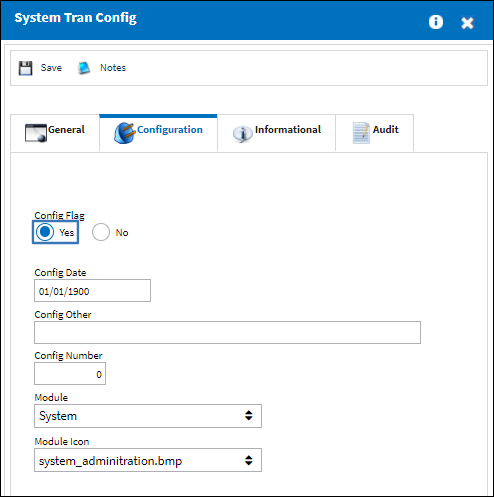
Switch Set to Yes:

When set to Yes, the System Date and Time from the database server will be placed on records when creating all transactions.

eMRO_SystemAdministration_Yes


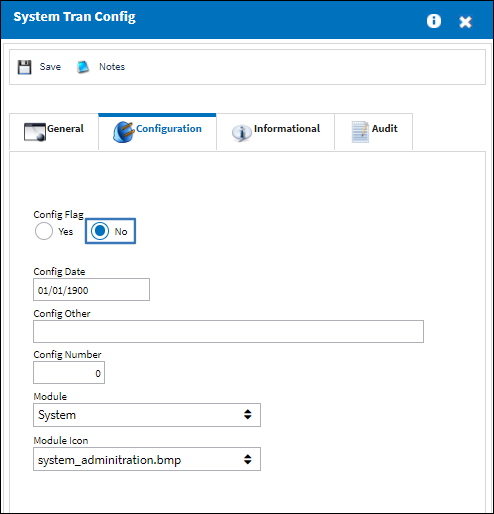
Switch Set to No:

When set to No, the System Date and Time from the Client PC will be placed on records when creating all transactions.

eMRO_SystemAdministration_No

Note: This is a Global Switch that has system wide effects. It should be set at implementation and left alone.

If this switch requires to be reset, please confirm that all users are logged out of the system.

Note: The setting of this switch does not affect the date and time applied to all prints. All prints use the local Client PC date and time.

See Also

System Administration Switches

AMYUNIPAPERSIZE - Default Paper Size for Amyuni Printers

BATCH - Default Paper Size for Amyuni Printers

BLOB - BLOB Next Sequence Number

BLOBSIZE - Specify File Size for BLOB (in Kilobytes)

CHECKPWRDHIST - Check Password History to Validate Against Recently Used Passwords

CONVPATH - Conversion Path

DOCEXE - Default path to External Document Management System program

DOCNO - Set Default Path in Config Other Field And Determine Next Sequence Number for Documents

DROPLIMIT - Number of Records in Drop Down Windows

EMAILDRV - E-Mail Print Driver Format

EMAILSEQ - Email Attachment Number Next SEQ

ESAVEPTH - Default Path to Save E-Mail Attachments

HELPFILE - Link Help File Path to Help Button

IMGNODEL - Images, Do Not Automatically Delete

INTRFSQL - Tracks the Date the Last Time the Interface SQL was Applied

JEWIPTRN - J/E Transaction Number Sequence

MEMREST - Recover Memory on Control Panel Activate

NOTEOVR - Allow Notes Override/ Modification By All Other Users

NOTES - Notes Next Sequence Number

NOTESTIMER - Cancel the Notification if there are New/Unread Notes in the Inbox

ORDRRCDP - Order Receiving Discrepancy Transaction

PDFMERGECOMMAND - Execute Batch File Using OS Shellexecute Command in PDF Merge

POPUPMSG - Notes Pop-Up Message Notification Instead of Audio Notification

PPREVIEW - Print Preview Files Library Path

PRINTDIR - Set the path for the Work Pack Print printer job program to write the result reports

PRINTSEL - Print Data Selection Page With Reports

PRINTSGN - Change Printer on Sign-On

PRNATTDOCS - Print Document Control Attachments

SECMALP - Security Password Minimum of Alpha Characters

SECMCALP - Security Password Minimum Number of Lower Case Alpha Characters

SECMID - Security ID Minimum Number of Characters

SECMNC - Security Password Minimum Number of Numeric Characters

SECMPAS - Security Password Minimum Number of Characters

SECNPTRY - Security Number of Password Retry Before Account Deactivation

SURAUTPRT - Automatic Print Survey

SYSDTTZC - System Date Time Zone Conversion

SYSLOCZONE - Main Station Location Time Zone

SYSPRTSC - System Prints Security

TAB - TAB Next Sequence Number

TMPDIR - Path of Temporary Directory

UATTIMEOFF - Turn Off the User Display and Server Time

UPGRADEVER - Automatic Upgrade Prompt

VIDEOPH - Video Documentation Library Path

WALLHOLD - Invalid Wall Password for Employee on Hold

Top of Page Download Online Help Print