
 Share
Share
 Print
Print
|
|
|
|
|


The Task Card control function allows you to attach known (existing) Task Cards to this E/C.
These Task Cards have their own set-up and requirements.
When an E/C is added to a Work Order to be complied with, the Task Cards attached to the E/C will be copied into the Work Order.
If A/C Effectivity is switched 'on' for the Task Cards, only Task Cards with the same Effectivity as the aircraft listed on the Work Order will be copied.
Select the Task Card Control  button.
Any number of Task Cards can be added via this option.
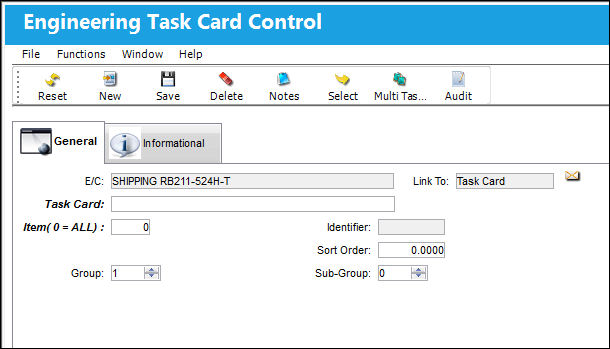
The following information/options are available in this window:
_____________________________________________________________________________________
Task Card
The Task Card / Job Card that details the scheduled maintenance work. In the Task Card field, specify the Task Card that will be attached to the E/C.
Sort Order
Allows the user to specify the order that the E/C's Task Cards will be sorted in. These sequence numbers are sorted according to their numeric values.
Applicable A/C
The A/C that this Task Card will be effective to. If left blank, the Task Card will be effective to all aircraft that the E/C is effective to.
Group
Groups allow the user to create a template that will be used to automatically create complex Work Orders based on parameters set up using the Group and Sub-Group fields.
Subgroup
Sub-Groups allow the user the option to further expand the relationships between Groups by creating Groups within Groups. Essentially, Work Orders within Work Orders.
_____________________________________________________________________________________
In the case of an AD, there may be many cards that require entry and have different Effectivity for different aircraft. To add as many cards as desired, continue by clicking on the New  button.
In the case of a large maintenance event such as a C-Check Inspection, there may be a large number of cards that require entry. The user also has the option to utilize the Multi Task Card Select button when adding multiple cards at once to an E/C. This speeds up the process and allows the user to select multiple cards at once and add them to the E/C and Task Card link window in one step.
Additional information can be included through the Notes  button, along with past information records able to be viewed through the Engineering Task Card Control, Informational tab and Audit
  button.
Share
Print
|
©1997-2026 Trax USA Corp. All rights reserved. This manual may not be copied, photocopied, reproduced, translated, or converted to any electronic or machine-readable form, in whole or in part, without prior written approval from Trax USA Corp. |
 |