
 Share
Share
 Print
Print
|
|
|
|
|


The Task Card Item, Skills tab allows users to view the labor requirements (i.e. Skills, Man Hours, and Men Required) to complete an item on a Task Card. The labor requirements set up for items will be linked to the Task Card and will follow the Task Card wherever it goes (i.e. Work Orders, etc). The user also has the option to add new labor requirements to already existing requirements to complete a Task Card.
While this topic explains how to add labor requirements to a Task Card manually, keep in mind that a default Skill can also be added to Task Cards automatically and imported into the system via the Import From OEM Load option. This option allows the user to import multiple Task Cards at once, after a Skill has already been set up. For additional information, refer to the Import From OEM Manual Button, via the TraxDoc Training Manual.
Labor requirements can also be set up on a per Work Order basis, meaning that once the item for the W/O Task Card has been completed, the the W/O Task Card Item will no longer be associated to the Task Card record from the Engineering module. This must be set up via the W/O Task Card via the Production module. For additional information, refer to the W/O Task Card Item, Skills Tab, via the Production Training manual.
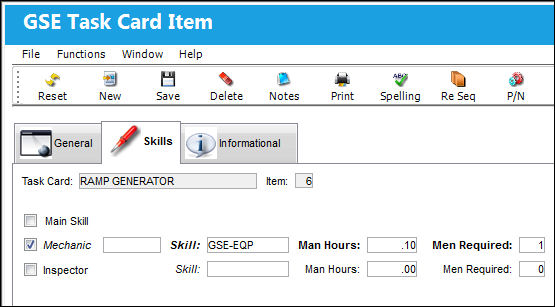
The following information/options are available in this window:
_____________________________________________________________________________________
Main Skill checkbox
Select this checkbox if this is the primary skill of the Task Card. The user can then organize the Task Cards by primary skill (using filter and sort functionality via the related modules such as Production Work Orders.)
 TCMSMAN - If set to Yes, the main skill for a Task Card Item is mandatory. The system will not allow you to exit the Task Card item window without the Main Skill checkbox checked.
Mechanic checkbox
Select this option to enter any code number related to the mechanic (i.e. skill level). The code field only appears when the checkbox is checked.
Inspector checkbox
Select this option to enter any code number related to the inspector (i.e. skill level). The code field only appears when the checkbox is checked.
Skill
The Skill of the employee required for this item. Skills are set up via the Skill Master. The Skills listed for Mechanic or Inspector are validated against the Mechanic/Technician checkboxes associated to the specific Skill via the Skill Master, General tab. For more information, refer to the Skill Master, General Tab via the Settings Manual.
Man Hours
The labor hours (per person) required for this Item.
- TCOPTMAN - If set to Yes, the system will not make the Man Hours field mandatory. If set to No, the system will make Man Hours field mandatory in the Task Card.
Men Required
The number of personnel required for this Item.
_____________________________________________________________________________________
Share
Print
|
©1997-2026 Trax USA Corp. All rights reserved. This manual may not be copied, photocopied, reproduced, translated, or converted to any electronic or machine-readable form, in whole or in part, without prior written approval from Trax USA Corp. |
 |