
 Share
Share
 Print
Print
|
|
|
|
|


The W/O Non-Routine Task Card, Optional 1 tab allows the user to enter/update optional information related to a Non-Routine Task Card. This window is accessed from the Work Order Detail window via the Non-Routine Task Card  button.
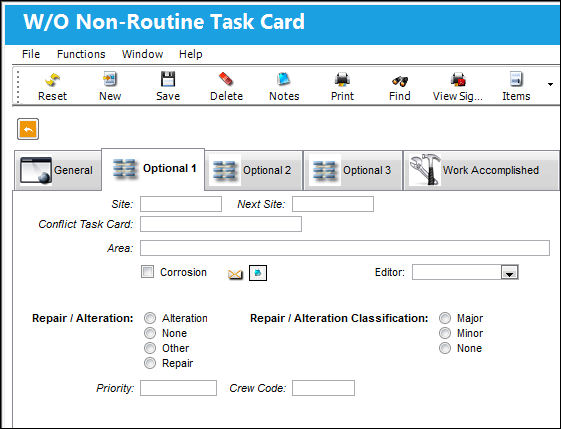
The following information/options are available in this window:
_____________________________________________________________________________________
Site
The Site where the work is to be carried out (if applicable).
Next Site
The Next Site where a component would be moved to upon completion.
Conflict Task Card
If a Task Card is specified here, it will indicate that the current Task Card should not be performed should it appear in a Work Order with the specified Task Card.
Area
The Area of the aircraft which this Task Card is related to, as defined in the Trans Code.
Corrosion Checkbox
Indicates that this is a Corrosion Card. If this box is checked, the appropriately related field will appear on the Work Order.
Editor
Using the Editor drop-list on the Optional 1 Tab of the Task Card, the user can choose the editor that will be used to edit each Task Card Item (Step) on an individual basis. The user may set the value for all new Task Cards with the following configuration switch.
Repair / Alteration
None - Defines if the record requires Repair or Alteration.
Other - The component is neither altered or repaired. This is a miscellaneous option.
Alteration - This compliance of the Non-Routine Task Card will alter the component (i.e. the removal or addition of sub-components).
Repair - The compliance of the Non-Routine Task Card will repair the component (i.e. a structural component has sheet metal work completed to strengthen the integrity of the structure). When Alteration or Repair is selected, the Repair/Alteration Classification field appears:
 MAJORREPAIRMAN - (Make the Major Repair mandatory in Engineering, Production, Shop, and Technical Records) When set to Yes, the Repair/Alteration and Repair Alteration Classification option fields will be mandatory on certain tabs. The appearance of these fields will change from drop-down lists to radio button selections. When set to No, the Repair/Alteration and Repair Alteration Classification option fields are not mandatory and do not require specific matching. The option fields will appear in a drop down menu.
Repair / Alteration Classification - Select the level of Repair/Alteration required for this Non-Routine Task Card.
_____________________________________________________________________________________
Share
Print
|
©1997-2026 Trax USA Corp. All rights reserved. This manual may not be copied, photocopied, reproduced, translated, or converted to any electronic or machine-readable form, in whole or in part, without prior written approval from Trax USA Corp. |
 |