
 Share
Share
 Print
Print
|
|
|
|
|


The W/O Non-Routine Task Card, Optional 2 tab allows the user to enter/update optional information related to a Non-Routine Task Card. This window is accessed from the Work Order Detail window via the Non-Routine Task Card  button.
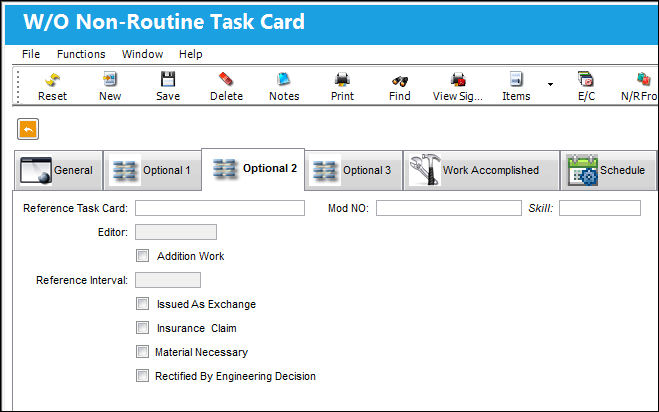
The following information/options are available in this window:
_____________________________________________________________________________________
Reference Task Card
Additional Reference for Customer Task Cards.
Mod NO
Modification Numbers for E/Cs. This field is informational only.
Skill
The Skill required for this Item.
Editor
The application that will be used to edit the Non-Routine Task Card information. The application will also be used to edit Non-Routine Task Cards when those Non-Routine Task Cards are placed on Work Orders via Production/Update/Work Order. Selectable formats include: Word ®, TASKCARD, or the default Powerbuilder ® RTF (i.e. NONE). This is a customized layout for the Non-Routine Task Card.
Addition Work
Select this checkbox to indicate additional work. When selected in this window it is automatically selected in the General tab and vice versa.
Reference Interval
The Task Card / Non-Routine Task Card reference interval is the schedule for this work requirement. This is an informational field and the schedule is derived from the E/C that the Task Card is associated to.
Issued as Exchange
Check to indicate that the item is issued as an exchange.
Insurance Claim
Select this checkbox if an Insurance Claim applies. Then specify the applicable Insurance Claim Number; the total cost of the Order or Work Order will appear on the Insurance Claim for collection from the Insurance company. For additional information, please refer to the Insurance Claim section of the Orders Manual. If selected, the Claim Number field will be mandatory.
Claim Number - The Insurance Claim number to associate with the item.
Material Necessary
Check to indicate that material is necessary to complete the Non-Routine Task Card.
Rectified by Engineering Decision
Check to indicate that the Task Card was rectified by an Engineering decision.
_____________________________________________________________________________________
Share
Print
|
©1997-2026 Trax USA Corp. All rights reserved. This manual may not be copied, photocopied, reproduced, translated, or converted to any electronic or machine-readable form, in whole or in part, without prior written approval from Trax USA Corp. |
 |