
 Share
Share
 Print
Print
|
|
|
|
|


Export Button, via TraxDoc Export
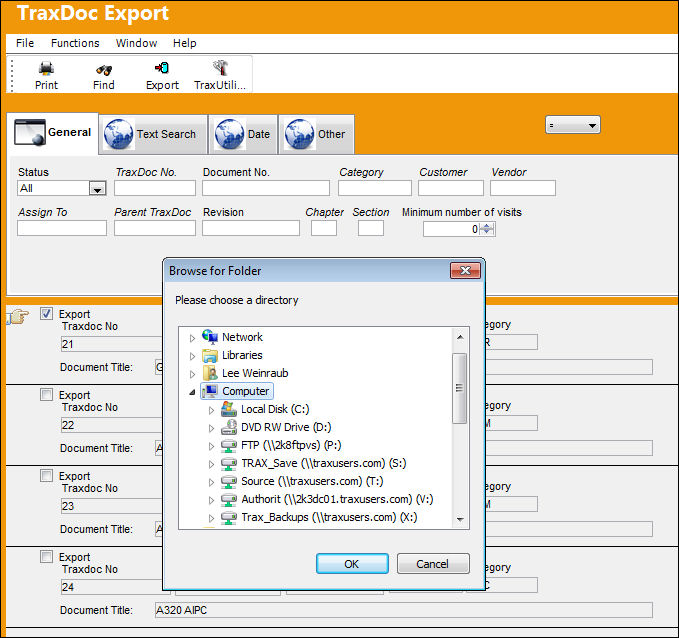
The system will create a folder(s) named with the TraxDoc Number and user will define where the folder will be saved.
Export a complete TraxDoc Document as follows:
- Go to TraxDoc/Update/TraxDoc File Export.
- Fill in the required field to narrow your search and Click the Find
 button.
 - Check the Export check boxes for the TraxDocs that you want to export and Click the Export
 button.
 - Select a directory in the Browse for Folder Window and Click OK.
- The system will create folders named with the TraxDoc Number in that directory and the files from those TraxDocs will be exported into these folders.
Additional Functionality:
The TraxDoc Explorer has functionality to export individual files from a TraxDoc Document. The exported files are renamed and saved to a location defined by the user. The User must have security access for this functionality which is set up in the TraxDoc Security Explorer. For more information, refer to the topic regarding how to Export Individual Files From a TraxDoc Document.
Share
Print
|
©1997-2026 Trax USA Corp. All rights reserved. This manual may not be copied, photocopied, reproduced, translated, or converted to any electronic or machine-readable form, in whole or in part, without prior written approval from Trax USA Corp. |
 |