 Download Online Help
 Print
|
|
|
|
|


Vendor Purchase Order Data Import
The Vendor Purchase Order Data Import serves as a tool to import data that vendors provide from an outside source, i.e. a CD.
It helps to create Purchase Orders that are available on a .csv (comma separated value) file by reading the data into the system and automatically creating a P/O and Receiving Record.
Please note that the file to be imported must be a .csv file in order to be read properly. (.csv-files can be created in Microsoft Excel).
Go to Orders/ Update/ Vendor Purchase Order Data Import.
Select a vendor and the file from which the user wishes to import data and select the Save  button to start the transfer.
Please note that the parts on the import file have to be:
- Non-rotables (non serialized)
- Known in P/N Master
- All in the same location
- Default Bin must be defined for the P/N
In order for the data to be read correctly, the following data scheme must be reflected in the source file:
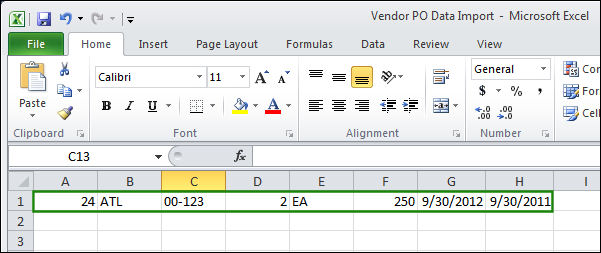
- Vendor
- Location
- Part Number
- Quantity
- UOM
- Unit Cost
- Shelf Life Expiry
- Date Received
It is important to make sure that the data provided from the outside source follows this scheme and order, otherwise the import will not be successful.
After a successful import, the system will automatically create a P/O and a Receiving record for the parts imported. Please note that the parts might have to undergo a receiving inspection as in a 'normal' receiving transaction if this is defined for the part number in the P/N Master.
Download Online Help
Print
|
©1997-2018 Trax USA Corp. All rights reserved. This manual may not be copied, photocopied, reproduced, translated, or converted to any electronic or machine-readable form, in whole or in part, without prior written approval from Trax USA Corp. |
 |