 Download Online Help
 Print
|
|
|
|
|


Repair Order Creation Queue
The R/O Creation Queue will display a list of part number records that must be sent out for repair. The list of records will match the employees predefined buyer settings in the Employee Master, Buyer Tab.
 The Repair Order Creation Queue is security controlled via Orders/ Update/ R/O Creation Queue. For additional information, refer to the Security Explorer via the System Administration Training Manual.
From this window, the user is able to select a record and place the part number onto a Repair Order.
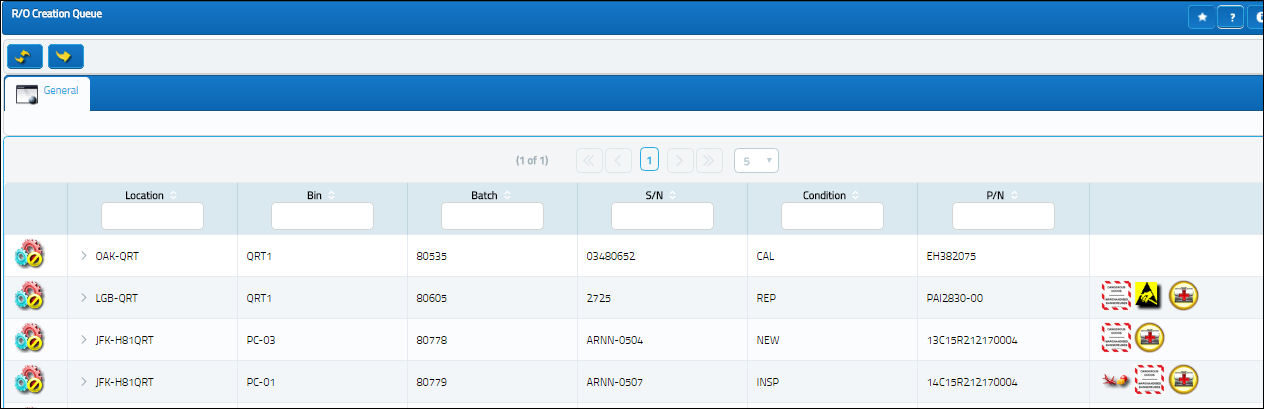
Once the Repair Order is created and completed, the queue will automatically refresh and the P/N will no longer display on the list provided.
The following options/information is available in this window:
_________________________________________________________________________
P/N Query Button
Select this button to view the P/N inventory detail information.
Location
The Location for maintenance events, inventory stores, orders, transactions, or training events.
S/N
The Serial Number for the specific serialized part.
Condition
The condition of the part.
Batch
The batch number that is associated with a part when introduced/received into the system.
Owner
The name of the owner of the part, when applicable.
Vendor Lot
Vendor batch number of the part entered upon receiving or intial load, as applicable.
Chapter / Section / Paragraph
The ATA chapter/section/paragraph, as applicable.
P/N
The Part Number reference for the aircraft part.
UOM
The unit of measure. This will default if associated with a Part Number as defined in the P/N Master. Transactions for parts can be conducted in a different UOM than defined in the P/N Master. However, upon receiving the UOM, conversion will automatically adjust the quantities, providing that the conversion rate is defined in the UOM System Transaction Code (via Setting/Explorer/System Transaction Code).
Goods Received Batch
The original batch number when the part was initially introduced/received into inventory.
Loan Category
Loan Part Category (short, long, or pool).
Shelf Life EXP
The shelf life expiration date of the part, as applicable.
Tool Life EXP
The tool life expiration date of the part, as applicable.
Physical Count Date
The last date the Physical Count to include the record was generated.
Counted By
The name of the user who generated the last inventory count for the record.
Tool Calibration Number
This is a unique number used to define a tool.
_________________________________________________________________________
The P/N Query  and Inventory Level
 buttons can be utilized to view the Inventory Detail and P/N Inventory Level, respectively, as needed for a reference.
Select the Reset  button to refresh the list of P/N records displayed in the Repair Order Creation Queue.
Download Online Help
Print
|
©1997-2018 Trax USA Corp. All rights reserved. This manual may not be copied, photocopied, reproduced, translated, or converted to any electronic or machine-readable form, in whole or in part, without prior written approval from Trax USA Corp. |
 |