
 Share
Share
 Print
Print
|
|
|
|
|


Planning Transaction Conditions
The System Transaction Codes are displayed with both the Code Names and Descriptions. The Code Descriptions directly illustrate their functionality and role in the system, as fields are populated and tasks are performed.
The Planning Transaction Conditions is hard-coded to include the following transactions:
- Plan Start Date Overdue
- The Work Due Has Had A Planned Start Date Set By Planning
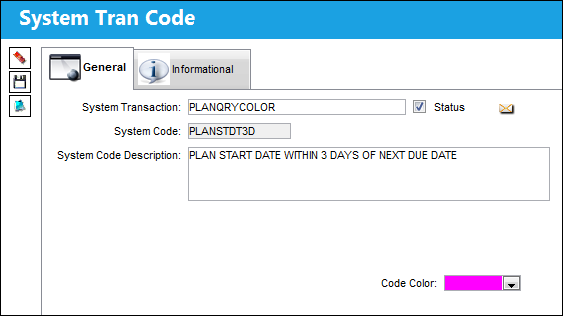
- Plan Start Date Within 3 Days of Next Due Date
- Plan Start Date Set Via E/C
Transaction Code: |
Planning Transaction |
General Description: |
Colors assigned to maintenance events depending on their status concerning due date and planned date. |
Authorization Steps Available: |
None |
System Notification Available: |
None |
Trax Control Panel Path(s): |
Planning/Query/A/C Planning Query, Detail |
Window(s): |
w_ac_planning_sel |
Related Switch(s): |
None |
Functions: |
Color-code maintenance events according to the due-status. |
Reports: |
None |
Available Functionality:
A color can be assigned to each category in the Trancode:
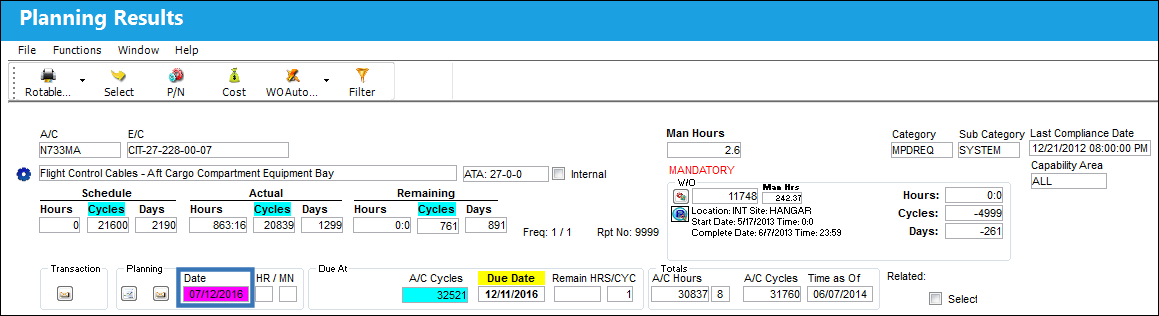
The maintenance events that go into the category specified in its Transaction Code will be displayed in the selected color in the Planning Date field of the A/C Planning Queries:
Share
Print
|
©1997-2026 Trax USA Corp. All rights reserved. This manual may not be copied, photocopied, reproduced, translated, or converted to any electronic or machine-readable form, in whole or in part, without prior written approval from Trax USA Corp. |
 |