
 Share
Share
 Print
Print
|
|
|
|
|


Absence Category Authorization Group
The System Transaction Codes are displayed with both the Code Names and Descriptions. The Code Descriptions directly illustrate their functionality and role in the system, as fields are populated and tasks are performed.
Transaction Code: |
Absence Category Authorization Group |
General Description: |
Absence Category Authorization Process Option. |
Are Authorization Steps Available? |
N |
Is System Notification Available? |
Y |
TRAX Control Panel Path(s): |
Planning/Update/Vacation Schedule |
Windows(s): |
|
Related Switch(s): |
|
Functions: |
Authorization Process Setting |
Reports: |
|
Available Functionality:
Alternative method of assigning who can authorize an Absence Schedule instead of the Department/Division/Section Option:
Instead applying Department/Division/Section restrictions as to who may be able to authorize a step within an authorization process users may now specify who belongs to a particular authorization group, to do so the user will need to set up the different required Absence Category Authorization Group via Setting/Explorer/System Transaction Code Explorer.
Set-up is identical to the creation of any other System Transaction Code and there are no embedded functionalities with the Absence Category Authorization Group Transaction Code as shown below:
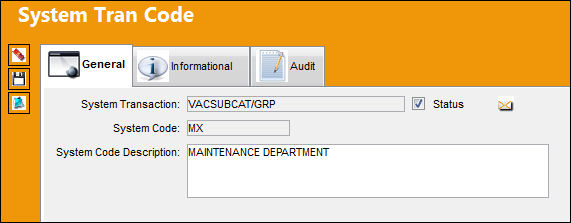
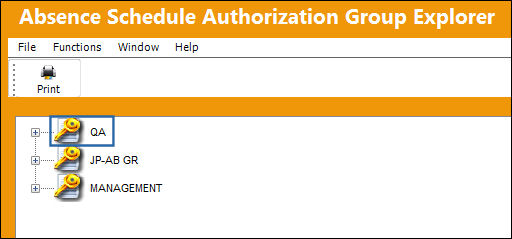
In the Absence Schedule Authorization Group Explorer window, users are categorized by the Adopted Group Profile they belong to in Security Explorer. This is configured for each individual user, and if they are not associated to any Adopted Group Profile, then they fall into the N/A Group Profile. For additional information regarding Group Profiles, refer to the System Administration Training manual.
If there are no Absence Groups displayed, or the Absence Authorization Group must be created, go to the System Transaction Code Explorer and select the Absence Category Authorization Group to create and manage these groups.
To create a new Absence Category Authorization Group System Transaction Code, select Absence Category Authorization Group and select New Record in the pop-up window.
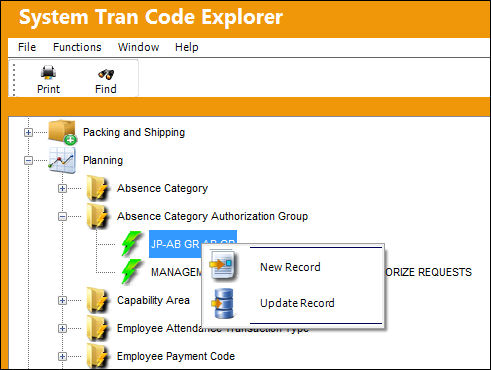
If the user would like to update the System Transaction Code, for example to change the long description, select the Update Record option and make the necessary changes.
Once TRAX displays the System Transaction Code Window, enter the desired code for the System Code and the long description for the System Code Description.
When completed, select the Save  button to save all information.
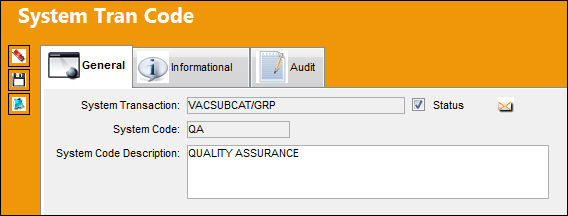
The Code is saved as shown below:
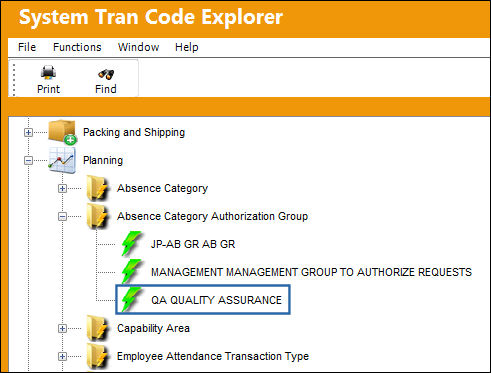
This process will successfully create the necessary Absence Category Authorization Group transaction codes in the Absence Schedule Authorization Group Explorer's left pane.
Share
Print
|
©1997-2026 Trax USA Corp. All rights reserved. This manual may not be copied, photocopied, reproduced, translated, or converted to any electronic or machine-readable form, in whole or in part, without prior written approval from Trax USA Corp. |
 |