
 Share
Share
 Print
Print
|
|
|
|
|


The status of the Wipe Existing Data checkbox will determine the outcome of a Task Card that is imported through the MPT.
For the MPT import, the status of the Task Card comes from the Boeing XML. This has nothing to do with the status of the Task Card in Trax.
 In Trax Version 11.5 and all releases, selecting the Wipe Existing Data checkbox will delete everything related to the Task Card including any E/C-T/C links upon importing a new revision. In Trax Version 12 and all later releases, this checkbox is no longer considered for the creation of a revision during import. Selecting the Create MPT and MPT787 TCs Revision checkbox will ensure that the revision is created. If the Create MPT and MPT787 TCs Revision checkbox is deselected, the revision will not be created and the Task Card will be imported in Open status.
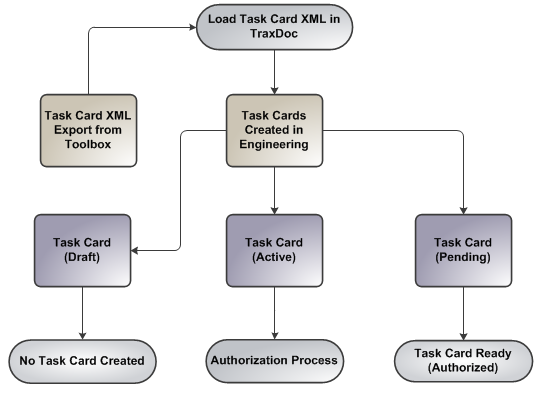
When the Wipe Existing Data checkbox selected:
- Task Card Status (Active): Task Card will be imported already authorized.
- Task Card Status (Pending): Task Card must go through the authorization process.
- Task Card status (Draft): No Task Card(s) will be imported.
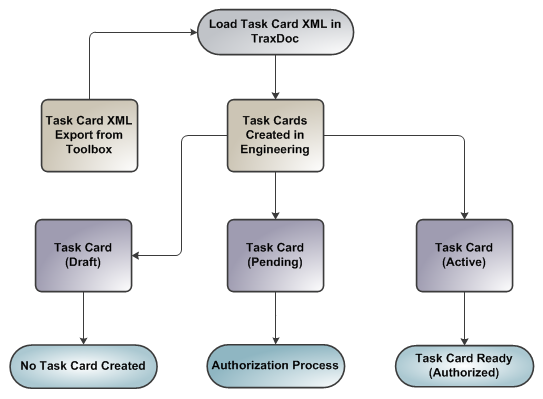
When the Wipe Existing Data checkbox deselected:
- Task Card Status (Active): Task Card must go through the authorization process.
- Task Card Status (Pending): Task Card will be imported already authorized.
- Task Card Status (Draft): No Task Card(s) will be imported.
Share
Print
|
©1997-2026 Trax USA Corp. All rights reserved. This manual may not be copied, photocopied, reproduced, translated, or converted to any electronic or machine-readable form, in whole or in part, without prior written approval from Trax USA Corp. |
 |