
 Share
Share
 Print
Print
|
|
|
|
|


If the Location/Site Configuration was set up for 'Capacity', then the applicable aircraft must be selected. The Location Site Configuration Effectivity button can either be selected manually, or once the Location Site Configuration window is saved, the Location Site Configuration Effectivity window pops up automatically.
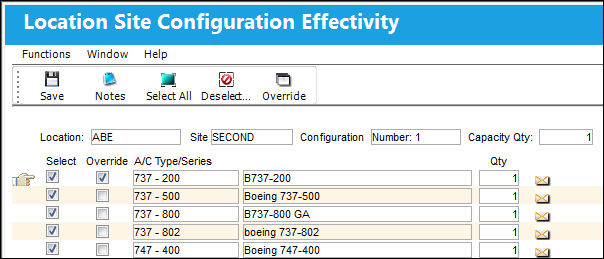
Select the aircraft types/series to include in the configuration, and enter the number of the most aircraft that can fit on the site (use the available Qty field). Then select the Override  button to specify the aircraft for the type/series that are effective.
The Capacity Qty for each of these Type-Series is set to one; therefore there can be no more than one of these Aircraft at this Location/Site at a time.
The Notes  and Override buttons are available for additional functionality.
Share
Print
|
©1997-2026 Trax USA Corp. All rights reserved. This manual may not be copied, photocopied, reproduced, translated, or converted to any electronic or machine-readable form, in whole or in part, without prior written approval from Trax USA Corp. |
 |