
 Share
Share
 Print
Print
|
|
|
|
|


In order to specify the configuration to tail numbers, select the Override checkbox next to the aircraft type and select the Override  button. TRAX displays the following:
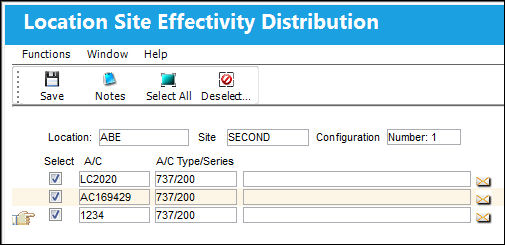
Define the tail numbers that are to be included in this configuration by selecting the respective checkboxes. Select the Save  button to save and return to the aircraft type screen. When planning work orders for sites that are set up with the capacity configuration, TRAX will automatically inform the user if the site is able to accommodate the aircraft at the planned time.
Share
Print
|
©1997-2026 Trax USA Corp. All rights reserved. This manual may not be copied, photocopied, reproduced, translated, or converted to any electronic or machine-readable form, in whole or in part, without prior written approval from Trax USA Corp. |
 |