
 Share
Share
 Print
Print
|
|
|
|
|


Engineering Authorization Management Print
The Engineering Authorization Management Print window allows the user to search and create Engineering Management prints.
 The prints in this window may be security controlled.
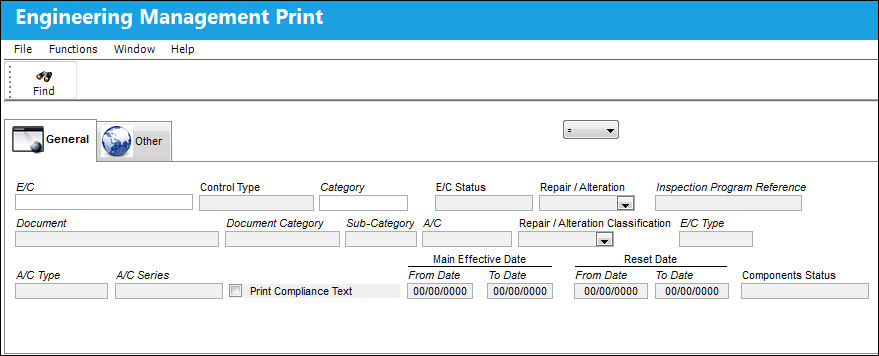
These are customized prints. Print layouts and options may vary per operator.
The following information/options are available in this window:
_____________________________________________________________________________________
E/C
The Engineering Control that specifies aircraft or component scheduled maintenance intervals.
Control Type
The Engineering Control Type (E/C or Task Card).
Category
The category of the E/C (e.g., AD, SB, CHECK).
E/C Status
The status of the E/C. When creating a new E/C the initial status will default to Pending; if the user requires to hold this E/C until ready it can be left as Pending, or alternatively it can be changed to another status.
Repair/Alteration
Defines if the record requires Repair or Alteration.
Inspection Program Reference
This field allows users to set a reference for all MPD tasks during the import process.
Document
Any document information to be referenced for the part.
Document Category
The document category code for the document reference associated to the E/C.
Sub-Category
A Sub Category can be used to further define the E/C Category, if applicable. For example, users may want to classify their ADs for Engines, APUs, and Landing Gear separately. The Sub Category System Transaction Code is set up via Settings/ Explorer/ System Transaction Code/ Engineering.
A/C
The individual aircraft tail number.
Repair-Alteration Classification
The level of Repair/Alteration (Major, Minor) required for this E/C.
E/C Type
The Engineering Control Type.
A/C Type
The type of aircraft.
A/C Series
The aircraft series the E/C is effective to.
Print Compliance Text
Select the Print Compliance Text radio button to print associated compliance data.
Main Effective
Entered as the date from which the user requires to track time on the E/C being set up unless a Total Schedule has been defined. Once the effective date is entered and the A/C or P/N Effectivity for the E/C is applied, changing the effective date on this Tab will not change the effective dates on each individual aircraft or component that the E/C is effective to. Either the Effectivity will need to be removed and re-applied, or the effective date field will need to be changed individually in the Effectivity Override window for each tail number or component.
Reset Date
The date the E/C was complied with.
Components Status
Status of the Component.
_____________________________________________________________________________________
Share
Print
|
©1997-2026 Trax USA Corp. All rights reserved. This manual may not be copied, photocopied, reproduced, translated, or converted to any electronic or machine-readable form, in whole or in part, without prior written approval from Trax USA Corp. |
 |