 Download Online Help
 Print
|
|
|
|
|


The Engineering Control Authorization, Location/Site Bin Control tab allows the user to view which locations will NOT be eligible to perform Work Orders that contain the currently selected E/C. prior to authorizing it. The information in this window is a copy of the Engineering Control, Location/Site Bin Control tab, and can be edited or updated with the appropriate security privileges.
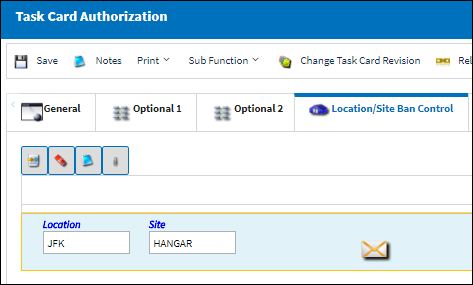
The following options/information is available in this window:
_________________________________________________________________________
Location
The location that will not be eligible to perform Work Orders that contain the currently selected Task Card.
Site
The site where the work should be carried out (if applicable).
_________________________________________________________________________
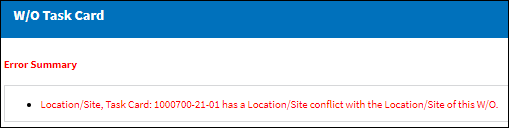
If a user tries to place this Task Card on a Work Order at any of the locations listed here, TRAX will display the following error message:
Multiple records can be added or removed through the New  and Delete
 buttons.
Relevant information can be included through the Notes  and Image
 buttons.
Download Online Help
Print
|
©1997-2018 Trax USA Corp. All rights reserved. This manual may not be copied, photocopied, reproduced, translated, or converted to any electronic or machine-readable form, in whole or in part, without prior written approval from Trax USA Corp. |
 |