 Download Online Help
 Print
|
|
|
|
|


Select the Steps  button to create, edit, or view the steps to be associated with the authorization process of this Manual. If authorization Steps were previously created for the currently selected Manual’s category, they will appear in the list of Steps.
If you make any changes to the sequence of Steps, the changes will be exclusive to the currently selected Manual Master, and will not affect the Authorization Steps that are associated with the Category (System Transaction Code) of the selected manual.
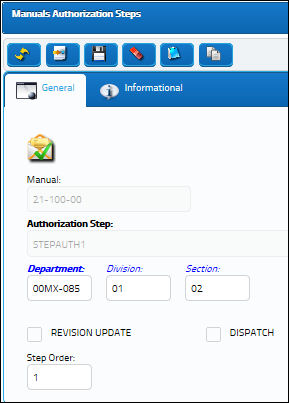
The following options/information is available in this window:
_________________________________________________________________________
Manual
Related Manual reference to be utilized for the record.
Authorization Step
A description of the Authorization Step; each Authorization Step can have its own unique description to describe the steps general purpose.
Department
The department which has authority for approval of this step. The Authorization Step can only be performed by an individual in the department specified here. See Settings/Update/Employee Master to verify that the employee is assigned to the appropriate department. Authorizing employees must have security access to the appropriate Authorization Explorer option. When this field is left blank, the Authorization Group field is available.
Division
The division which has authority for approval of this step. The Authorization Step can only be performed by an individual in the division specified here.
Section
The section which has authority for approval of this step. The Authorization Step can only be performed by an individual in the section specified here.
Revision Update
None
Dispatch
None
Step Order
This number indicates the order of Steps if one or multiple Steps are created. This number is automatically created and can be overridden and changed to any number. It is recommended that the user enter Steps in a standard incremental pattern (i.e. Step 5, Step 10, Step 15, etc.) to allow for the insertion of Steps into the sequence at a later time if required.
_________________________________________________________________________
The following are available for additional functionality:
- Manuals Authorization Steps, Information Tab
- Notes Button
- Authorization Copy Button
Download Online Help
Print
|
©1997-2018 Trax USA Corp. All rights reserved. This manual may not be copied, photocopied, reproduced, translated, or converted to any electronic or machine-readable form, in whole or in part, without prior written approval from Trax USA Corp. |
 |