 Download Online Help
 Print
|
|
|
|
|


Read & Sign Detail, General Tab
Upon selecting a Request Number, the following General tab is displayed.
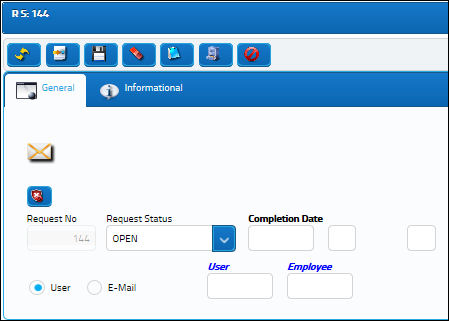
The following options/information is available in this window:
_________________________________________________________________________
Request No
The request number is automatically assigned by the system.
Request Status
The status of the Read & Sign. Select from one of the following two statuses:
- Open
- Closed
Requester Type
Once a Read & Sign is created, the user must add requests to the Read & Sign.
There are two types of requests:
User
Enter a User Name.
Employee
Select an employee within the User Name.
Resolution
Enter a Resolution for the Read & Sign before saving it to 'Closed' status.
Note: The Resolution field only appears when the Request Status is set to 'Closed.'
_________________________________________________________________________
Download Online Help
Print
|
©1997-2018 Trax USA Corp. All rights reserved. This manual may not be copied, photocopied, reproduced, translated, or converted to any electronic or machine-readable form, in whole or in part, without prior written approval from Trax USA Corp. |
 |