 Download Online Help
 Print
|
|
|
|
|


Add Users to the Read & Sign as follow:
From the Read & Sign Detail window, select the New  button. Select the 'User' Requester Type radio button. Populate all mandatory and desired fields and select the Save
 button.
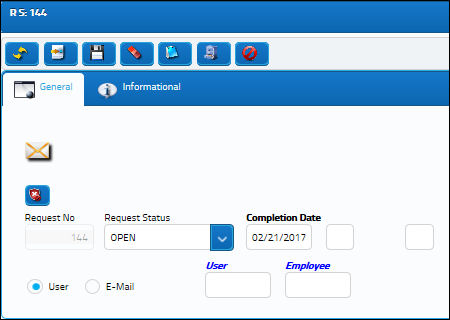
The following options/information is available in this window:
_________________________________________________________________________
Request No.
The request number is automatically assigned by the system.
Request Status
The status of the Read & Sign. For additional information, refer to the Read & Sign Detail, General Tab, via Read and Sign of the Library Training Manual.
Requester Type
Once a Read & Sign is created, the user must add requests to the Read & Sign.
User Requester Type - A User Request Type is for a eMRO User who will receive a Read and Sign Requirement Notice in the system. The recipient will acknowledge and close that notice.
User
Enter a User Name.
Employee
Select an employee within the User Name.
Note: If the Employee Field is left blank all employees under that User Name will be added to the request. Upon saving, a message appears asking if you want to load all employees under the user name.
_________________________________________________________________________
Download Online Help
Print
|
©1997-2018 Trax USA Corp. All rights reserved. This manual may not be copied, photocopied, reproduced, translated, or converted to any electronic or machine-readable form, in whole or in part, without prior written approval from Trax USA Corp. |
 |