 Download Online Help
 Print
|
|
|
|
|


Daily Shift Pattern
This window is only available when Planning Switch  LBRBYHCNT is set to 'No'. When set to 'No', man hour labor generation will be determined by employee and shift and not by the head count functionality. When set to 'Yes', this functionality is not available and the window cannot be accessed. For more information refer to Switch LBRBYHCNT via the Planning Switches Manual.
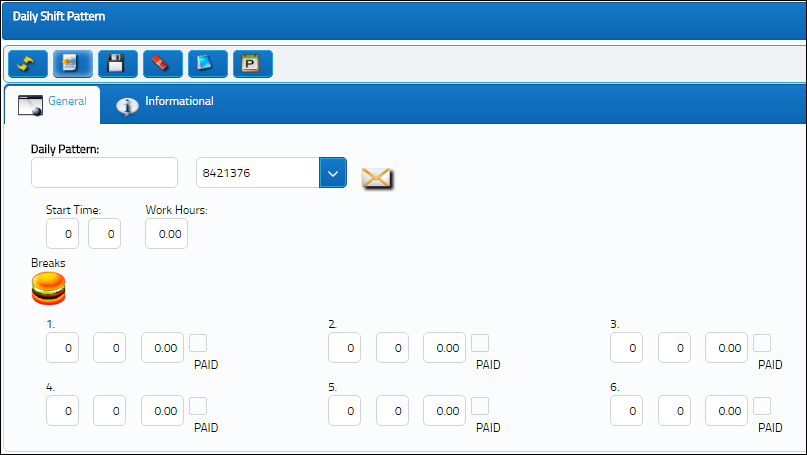
The following options/information is available in this window:
_________________________________________________________________________
Daily Pattern
Enter a name for the shift pattern.
Color drop down
Choose a color to represent the Daily Shift Pattern. This will help differentiate patterns as every time the pattern is entered into a shift it will stand out throughout the Planning windows where this employee schedule feature is used.
Start Time
Enter the start time of the shift.
Work Hours
Enter the number of hours employee(s) is/are expected to work for the shift specified.
Breaks (1-6)
Enter time for scheduled breaks and duration of break time.
Paid checkbox
Select this checkbox if the scheduled break is paid.
_________________________________________________________________________
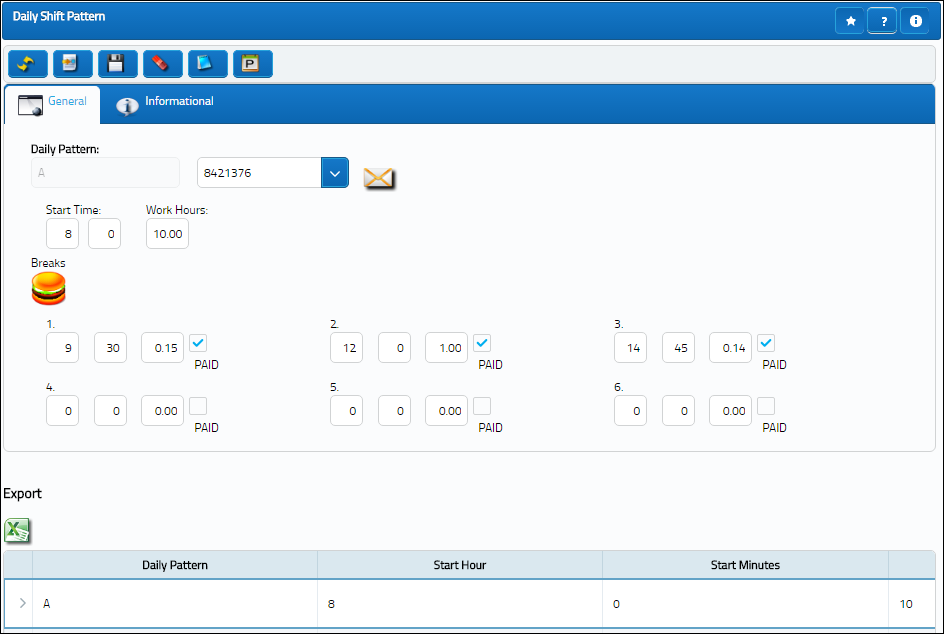
Populate all mandatory and desired fields and select the Save  button.
The daily shift pattern is saved as shown below:
The following are available for additional functionality:
Download Online Help
Print
|
©1997-2018 Trax USA Corp. All rights reserved. This manual may not be copied, photocopied, reproduced, translated, or converted to any electronic or machine-readable form, in whole or in part, without prior written approval from Trax USA Corp. |
 |