
 Share
Share
 Print
Print
|
|
|
|
|


Pre Receiving, General Tab
The Pre-receiving program allows the user to enter in the physical receipt of an order by location.
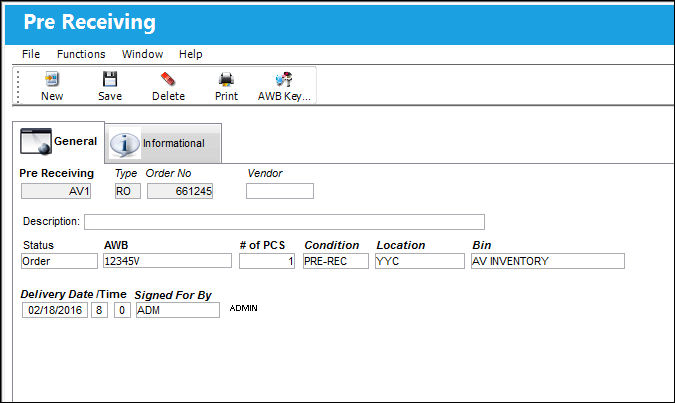
The following information/options are available in this window:
_____________________________________________________________________________________
Pre Receiving
The number of the pre-receiving shipment.
 PRERECSEQ - Next number to pre-receiving, if set to Yes.
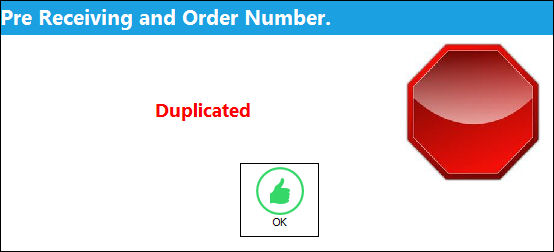
- If the Pre-receiving field is left empty, and then saved, the system will generate a pre-received number via the Configuration Number field. If the new number is already associated to an order a "Duplicated" message will appear.
- If the Pre-receiving field is left empty, and then saved, the system will generate a pre-received number via the Configuration Number field. If the new number is already associated to an order a "Duplicated" message will appear.
Type
The order type linked to the pre-receiving shipment.
Order No.
The order number linked to the pre-receiving shipment.
Vendor
The system code for the service/part provider. Allows for the selection of a vendor and orders associated with that vendor. Multiple orders can be pre-received simultaneously for the same vendor. Once the orders are selected, they are listed in the general tab.
Description
A short description of the pre-receiving shipment.
Status
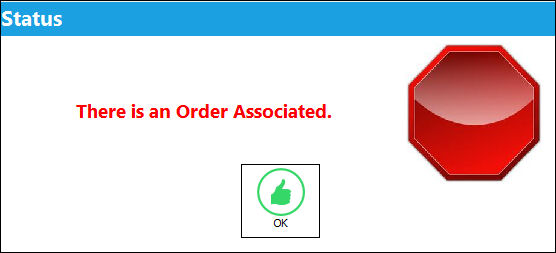
Open - Only for dock receipts that are not associated to an order. This status cannot be set manually. To save a Pre-Receiving order with the status of 'Open', leave the Pre-Receiving, Type and Order No fields blank. If the user tries to change the status of a Pre-Receiving order to 'Open' while the order has a Order reference number, the following error message will appear.
- CLRPREREC - (Do Not show orders in 'Open' status. When set to Yes, saved orders in 'Open ' status will be saved, but will not appear in the Pre-Receiving window. When set to No, saved orders in 'Open' status will appear in the Pre-Receiving window.
Order - An order reference number must be associated to the record.
Non-TRAX - For items with no order reference number and do not involve further system transactions. If selected, an order cannot be associated to the record. If an order is associated to the record, the following message will appear:
Although a Pre-Receiving Order with the status of 'Non-TRAX' can be saved, the record is not stored in Pre-Receiving.
- PRERECDAY - Defines the number of days to stay on pre-receiving. If set to Yes, this defines the number of days for a Pre-receiving record to be available for attachment from the Pre-receiving drop down query window. Once the number of days has surpassed the Pre-receiving record, the status will change to inactive.
AWB
The Airway bill number associated to the pre-receiving shipment.
# of PCS
The number of pieces.
Condition
The condition of the received package.
This has no bearing on the component Condition System Transaction Codes via Order Receiving.
Location
The Location for maintenance events, inventory stores, orders, transactions, or training events.
Bin
The specific storage bin within the inventory location.
Delivery Date /Time
The date and time that the shipment is physically received.
Signed For By
The TRAX employee who signed for the receipt of the shipment.
_____________________________________________________________________________________
Share
Print
|
©1997-2026 Trax USA Corp. All rights reserved. This manual may not be copied, photocopied, reproduced, translated, or converted to any electronic or machine-readable form, in whole or in part, without prior written approval from Trax USA Corp. |
 |