
 Share
Share
 Print
Print
|
|
|
|
|


AWB Key Scan Button, via Pre Receiving

The AWB Key Scan  button is a way to quickly and efficiently enable the user to scan Air Way Bills into pre-receiving. The AWBs can be linked to orders through the AWB/Expedite
  button, via each Order Type Detail. Utilizing this feature will bring the order into 'PRE RCVD' Status within Order Receiving.
Upon selecting the AWB Key Scan button, specific information must be populated along with some information automatically entered before the AWB can be scanned.
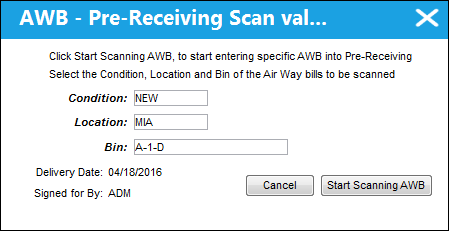
The following information/options are available in this window:
_____________________________________________________________________________________
Condition
The condition of the item(s) being scanned and received.
Location
The Location for maintenance events, inventory stores, orders, transactions, or training events.
Bin
The specific storage bin within the inventory location.
Delivery Date
The date in which the AWB Pre-Receiving Scan is being utilized.
Signed for By
The user accessing the Pre-Receiving record(s) and conducting the AWB Scan.
_____________________________________________________________________________________
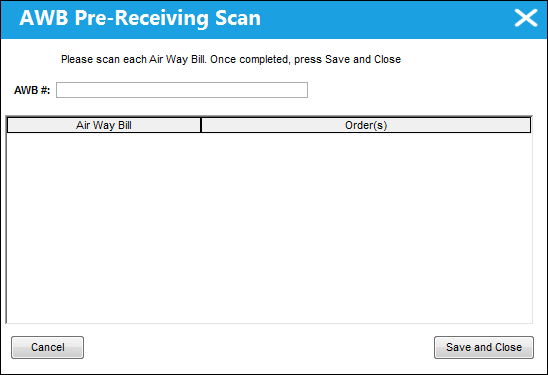
After specifying the necessary information, select the  button to enter the AWB numbers to be scanned.
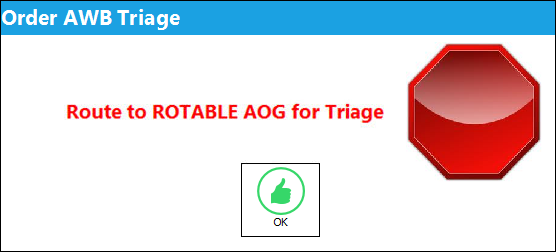
If the AWB # entered is associated to an AWB Triage code, the following soft warning will appear upon scanning the AWB / Order combination:
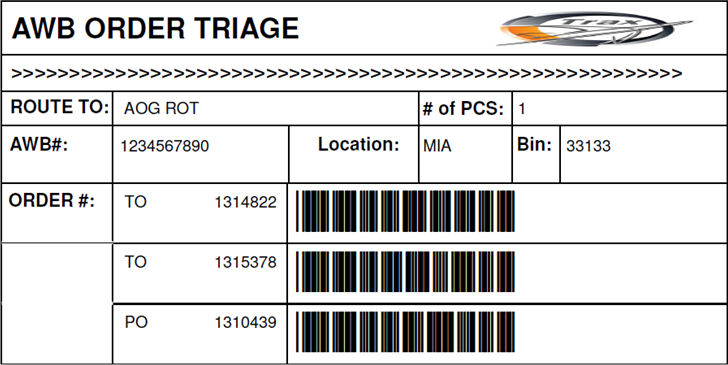
With an AWB Triage code associated, a Triage Tag is produced and will be available in the Pre Receiving window through the Triage Tag  button.
A Notification of the AWB Triage will be sent per the configuration set through the Order AWB Triage System Tran Code.
With each AWB # scanned and entered, the Air Way Bill and Order(s) combination appears in the AWB Pre-Receiving Scan window.
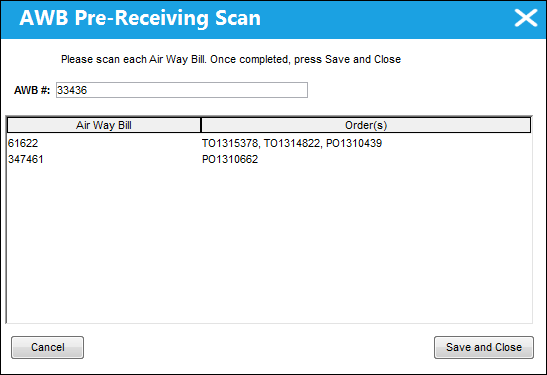
Select the  button to bring the specified Order(s) into Pre Receiving Status.
 Share
Print
Share
Print
|
©1997-2026 Trax USA Corp. All rights reserved. This manual may not be copied, photocopied, reproduced, translated, or converted to any electronic or machine-readable form, in whole or in part, without prior written approval from Trax USA Corp. |
 |