
 Share
Share
 Print
Print
|
|
|
|
|


Shop W/O Print
The Shop W/O Print window features a variety of Shop W/O-related print options. These prints can be searched for and created in this window.
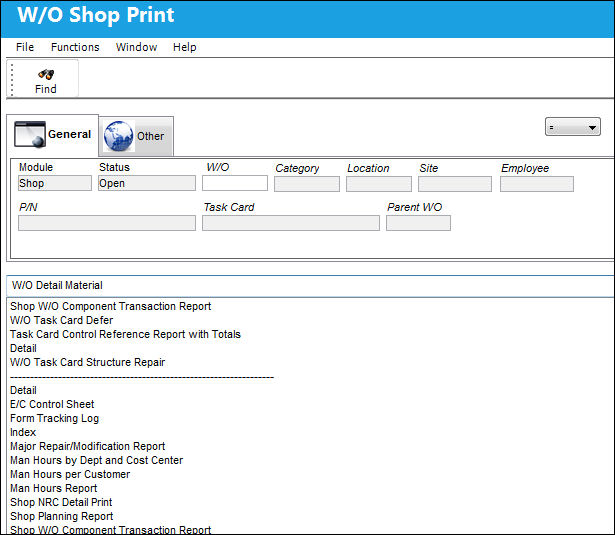
The following information/options are available in this window:
_____________________________________________________________________________________
General Tab
Status - The current W/O status.
W/O - The Work Order used to categorize, manage, and schedule work requirements for aircraft maintenance.
Category - Work Order Category code.
Location - The Location for maintenance events, inventory stores, orders, transactions, or training events.
Site -The Site where the work is to be carried out (if applicable).
Employee - The employee responsible for the creation of the W/O.
P/N - The Part Number reference for the aircraft part.
Task Card -The Task Card / Job Card that details the scheduled maintenance work.
Parent WO - The Parent W/O. For more information on Parent W/Os, please refer to the Change The Parent Work Order button section of the Productions manual.
Other 1 Tab
Sched. Start Date (From-To) Range - The scheduled start date/time for implementing the Work Order
Sched. Completion (From-To) Range - The scheduled start date/time for implementing the Work Order
Actual Start Date (From-To) Range - The actual start date/time for implementing the Work Order.
Actual Complete Date (From-To) Range - The actual completion date/time for implementing the Work Order.
_____________________________________________________________________________________
Share
Print
|
©1997-2026 Trax USA Corp. All rights reserved. This manual may not be copied, photocopied, reproduced, translated, or converted to any electronic or machine-readable form, in whole or in part, without prior written approval from Trax USA Corp. |
 |