 Download Online Help
 Print
|
|
|
|
|


Shop W/O Closing, General Tab
The Shop W/O Closing, General tab contains the following information.
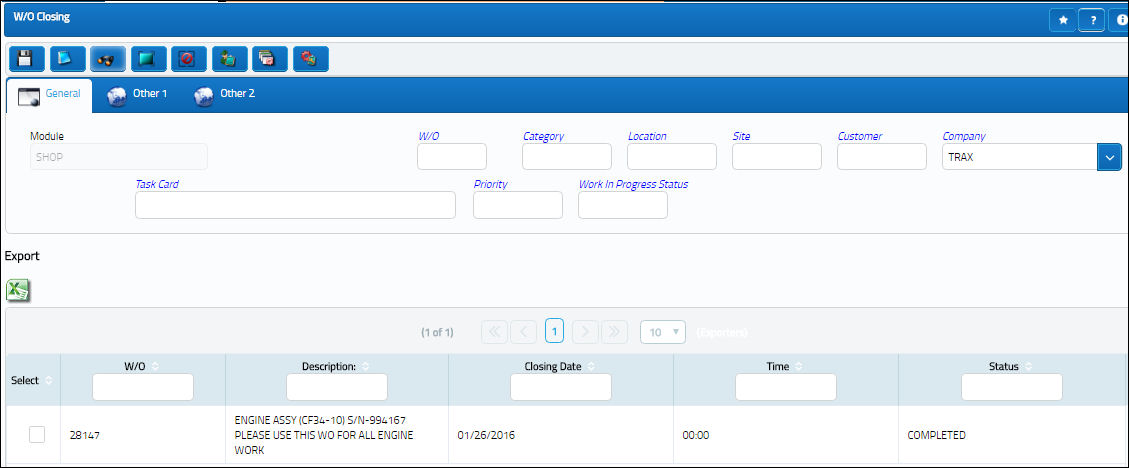
The following options/information is available in this window:
_________________________________________________________________________
W/O
The Shop Work Order reference number.
Category
The Shop Work Order Category.
Location
The Location for maintenance events, inventory stores, orders, transactions, or training events.
Site
The site where the work should be carried out (if applicable).
Customer
The customer for whom the Work Order was created.
Company
The company the Work Order was created for.
Task Card
The Task Card / Job Card that details the scheduled maintenance work.
Priority
The priority of the Work Order (e.g., Urgent).
Work in Progress Status
Select a System Transaction Code to query by. This field is informational only and used for the purpose of querying for specific Work Orders.
_________________________________________________________________________
For more details on the Shop W/O Closing process, refer to the Shop W/O Closing window.
Download Online Help
Print
|
©1997-2018 Trax USA Corp. All rights reserved. This manual may not be copied, photocopied, reproduced, translated, or converted to any electronic or machine-readable form, in whole or in part, without prior written approval from Trax USA Corp. |
 |