
 Share
Share
 Print
Print
|
|
|
|
|


The A/C P/N Transaction History Supervisor Detail, Other tab allows the user to modify existing information for an A/C P/N Transaction record. This feature allows for corrections against A/C P/N Transaction record, such as the Transaction Date (which thereby provides the ability to alter the install or removal date of a transaction). This option is to be run with extreme caution by authorized supervisory personnel only.
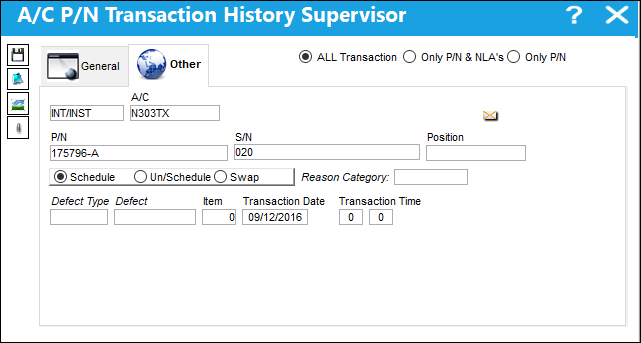
 This tab is security-controlled via Technical Records/ Update/ A/C P/N Transaction Supervisor/ Other. For more information refer to the Security Explorer.
The following information/options are available in this window:
_____________________________________________________________________________________
All Transaction radio button
If selected, relates any altered data to both transactions (install & remove where applicable).
If selected, the modified transaction information will be applied to all NLAs and any NHAs if applicable.
Only P/N & NLA's radio button
If selected, relates any altered data to only the P/N the transaction is for.
If selected, the modified transaction information will only be applied to the P/N and all NLAs.
Only P/N radio button
If selected, relates any altered data to only the P/N the transaction is for.
A/C
The individual aircraft tail number.
P/N
The Part Number reference for the aircraft part.
S/N
The Serial Number for the specific serialized part.
Position
The Position of the item being installed.
Schedule radio button
Select this radio button if this is a scheduled component change.
Unschedule radio button
Select this radio button if this is an unscheduled component change.
Swap radio button
Select this radio button if this component change is a result of a swap.
Reason Category
Reason for Part Number transaction.
Defect Type
The type of defect found on the aircraft (for example, Pilot Report, MX Report). For additional information, refer to the Defect Type Transaction Code, via the Technical Records Transaction Code Manual.
Defect
The defect number (or log book number).
Defect Item
The defect log item number.
Transaction Date/Time
The Date and Time of the transaction (on the aircraft).
Removal Reason
The reason the Part Number was removed from the aircraft.
_____________________________________________________________________________________
Share
Print
|
©1997-2026 Trax USA Corp. All rights reserved. This manual may not be copied, photocopied, reproduced, translated, or converted to any electronic or machine-readable form, in whole or in part, without prior written approval from Trax USA Corp. |
 |