 Download Online Help
 Print
|
|
|
|
|


The Copy Security  button allows administrators to replace/modify one user's security with another user's. For example, a profile user could be created for Purchasing; this profile user is then used to copy security to all the other users in Purchasing. The user who's security settings are being modified must already have been created in the system (use the New User option to create the user). Click on the Copy Security button and the system displays the Security Copy window as follows:
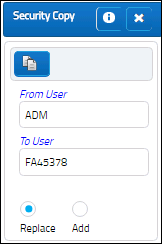
The following options are available in this window:
_________________________________________________________________________
From User
The user from whom security information will be copied.
To User
The user to whom security information will be copied. This field is automatically populated with the user selected in the Security Explorer.
Replace radio button
Replaces the To User's security with the From User.
Add radio button
Adds the From User's security to the To User's security without disabling any security already applied to the To User.
_________________________________________________________________________
Download Online Help
Print
|
©1997-2018 Trax USA Corp. All rights reserved. This manual may not be copied, photocopied, reproduced, translated, or converted to any electronic or machine-readable form, in whole or in part, without prior written approval from Trax USA Corp. |
 |