
 Share
Share
 Print
Print
|
|
|
|
|


Performing the Audit - Changing the Status of the Audit Steps
Once you have determined which Audits are due via Quality Assurance/Print/Audit Requirement, the Audit (that is due) should be performed. Performing the Audit entails changing the status of the individual Audit Steps that are associated with the Audit.
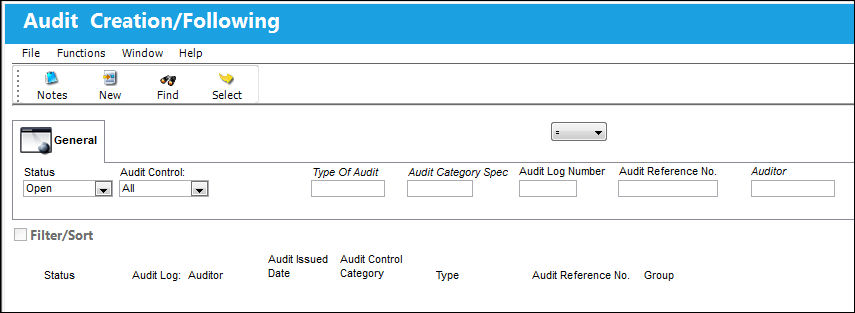
As with the majority of the query selections on the system, it is better to select as many parameters as required to minimize your search result.
Once you have selected the criteria, select the Find  button. Your search result will appear.
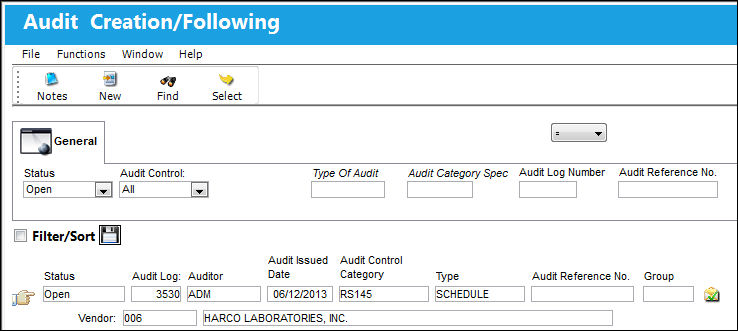
Confirm that the Hand  pointer is pointing to the record with which you want to work by clicking on the record. Select the Select
  button to view or update the related data. The Audit will appear with the Auditor Tab active. The system will automatically bring in any required Steps as per setup in the Audit Control Category in Settings/Explorer/System Transaction Code/QA - Audit Type.
Share
Print
|
©1997-2026 Trax USA Corp. All rights reserved. This manual may not be copied, photocopied, reproduced, translated, or converted to any electronic or machine-readable form, in whole or in part, without prior written approval from Trax USA Corp. |
 |