
 Share
Share
 Print
Print
|
|
|
|
|


Click on the E-mail  button to send the currently selected document to an email recipient.
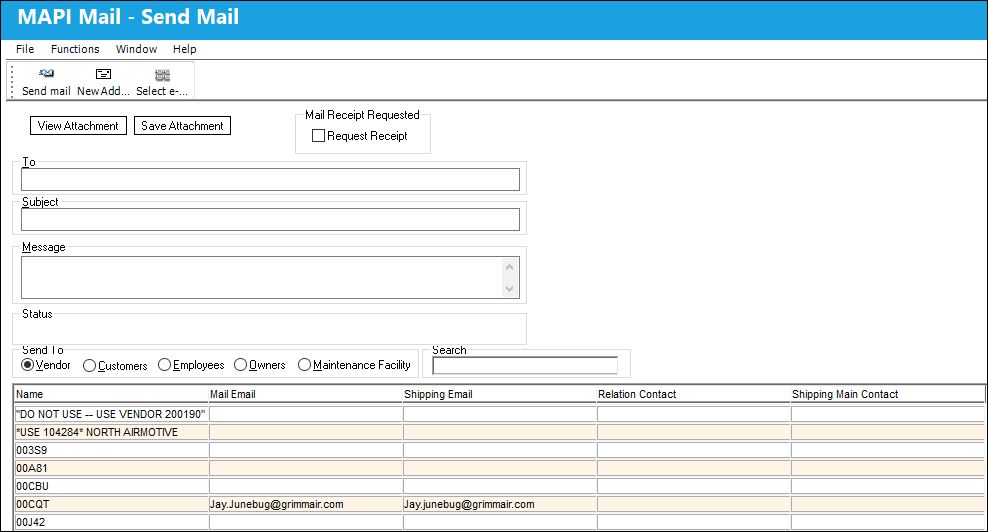
The following information/options are available in this window:
_____________________________________________________________________________________
View Attachment button
Select to view the attachment.
Save Attachment button
Select to save the attachment.
Main Receipt Requested- Request Receipt checkbox
Click to receive a receipt that the email was received.
To
The recipient's email address.
Subject
The topic of the email.
Message
The email message.
Status
The status of the email.
Send To radio buttons
Select the category of the recipient.
Vendor - The service/part provider.
Customers - The recipient of the goods/services.
Employees - The user employed by the company.
Owners - The name of the owner of the part.
Maintenance Facility - This location can be used for Work Orders (Production/Shop). This same Location can also be set as the Maintenance Facility (like A/C OH, Line Maintenance, etc.).
Search
Allows users to filter all results displayed in the table based on whatever text is entered in this field.
Name
Name of recipient.
Mail Email
The email address associated with the mailing address.
Shipping Email
The email address associated with the shipping address.
Relation Contact
The name of the contact related to the email address.
Shipping Main Contact
The name of the main shipping contact.
_____________________________________________________________________________________
Share
Print
|
©1997-2026 Trax USA Corp. All rights reserved. This manual may not be copied, photocopied, reproduced, translated, or converted to any electronic or machine-readable form, in whole or in part, without prior written approval from Trax USA Corp. |
 |