
 Share
Share
 Print
Print
|
|
|
|
|


The Print  multi-button generates shipping documents related to the shipment in question, or required labels for the selected items.
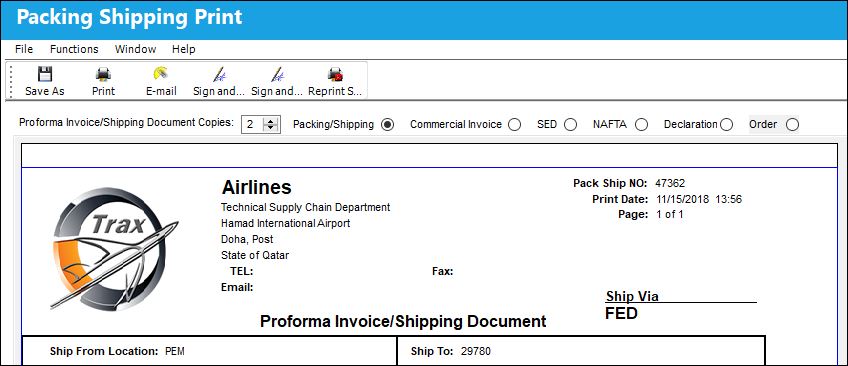
The following information/options are available in this window:
_____________________________________________________________________________________
Proforma Invoice/Shipping Document Copies
Select number of copies of proforma invoices and/or shipping documents needed.
Packing/Shipping radio button
Select to print a Packing/Shipping document.
Commercial Invoice radio button
Select to print a Commercial Invoice document.
SED radio button
Select to print a Shipper's Export Declaration document.
NAFTA radio button
Select to print a North American Free Trade Agreement Certificate of Origin document.
Declaration radio button
Select to print a Declaration for Free Entry of Returned American Products document.
Order radio button
Select to print the Order document.
_____________________________________________________________________________________
If one or several of the packed parts are marked as Hazardous Material in Settings / Update / P/N Master, the system will also print the Dangerous Goods Declaration.
The following buttons offer additional functionality:
- Save As button
- Print button
- E-mail button
- Sign and Print All button
- Sign and Print button
- Reprint Signed Doc button
Share
Print
|
©1997-2026 Trax USA Corp. All rights reserved. This manual may not be copied, photocopied, reproduced, translated, or converted to any electronic or machine-readable form, in whole or in part, without prior written approval from Trax USA Corp. |
 |