
 Share
Share
 Print
Print
|
|
|
|
|


When the P/N Software Configuration  button is selected, a Software Configuration popup window appears. The Software Configuration window displays each A/C Type/Series and the Software Location IDs (SLIDs) that are effective to the selected P/N Software.
Note: SLIDs will only display under an A/C Type/Series if they are set up in the main P/N Software Configuration window.
Note: The Software Configuration window appears for the P/N Software row the cursor was selected on before the button is selected.
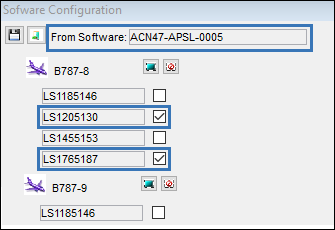
The Select All  and Deselect All
  buttons can be used to select/deselect the checkboxes for the entire fleet, or use the individual SLID checkbox.
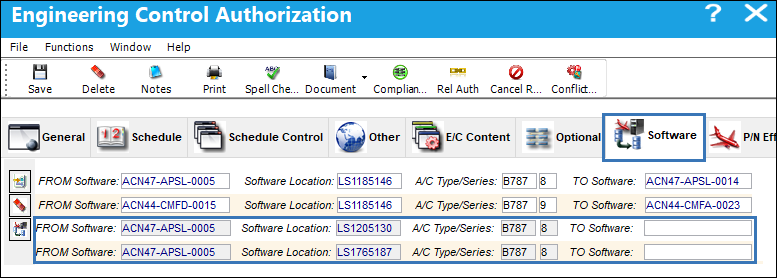
Once the Save  button is selected the system will create a new row in the Software tab for each SLID selected in the above popup. The TO Software field is left open, and once populated the record can be saved.
Share
Print
|
©1997-2026 Trax USA Corp. All rights reserved. This manual may not be copied, photocopied, reproduced, translated, or converted to any electronic or machine-readable form, in whole or in part, without prior written approval from Trax USA Corp. |
 |