
 Share
Share
 Print
Print
|
|
|
|
|


The A/C Type Series Forms Survey window is where the user sets up survey questions that can be viewed and answered from the PilotLog app.
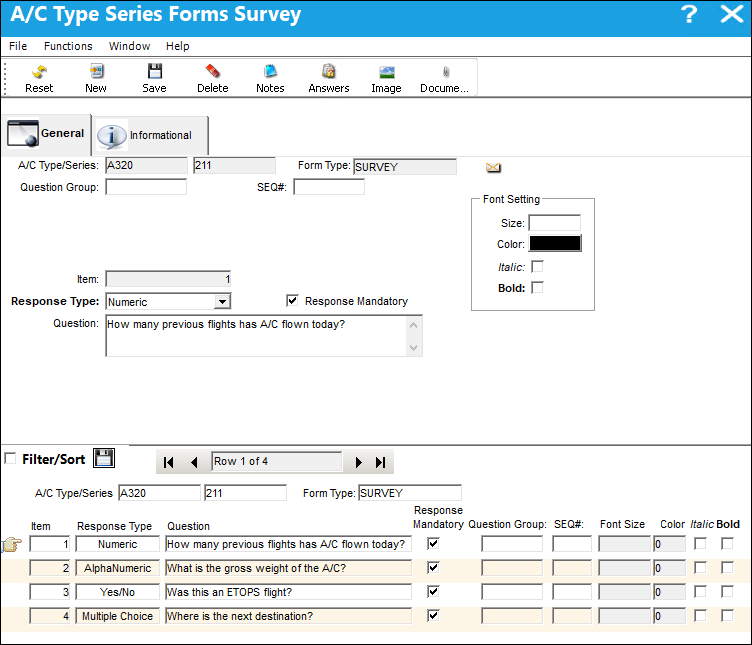
The following information/options are available in this window:
_____________________________________________________________________________________
A/C Types/Series
The Aircraft Type and Series/Fleet assignment.
Form Type
The user defined purpose of the survey form (e.g, Fluids, Bird Strike).
Question Group
Used to bundling multiple questions together to differentiate between certain question types.
SEQ#
Enter '1' in this field and two additional fields will appear: Group Title, Group Description.
Group Title
The title given to the Question Group.
Group Description
The description for the Question Group.
Item
The question number/ID.
Response Type
This determines the functionality and the type of response that is acceptable for the question.
- Alphanumeric - The response can include both letters and numbers.
- Numeric - The response will include only numbers.
- Alphanumeric Range - The response will consist of a range and both letters and numbers can be used.
- Yes/No - The response will be either Yes or No. When a Yes/No response type is used, a Yes and No button is available in the window that can be used to set up sub-survey questions that are triggered based on the user's answer upon completing the survey. For more information, refer to Further Survey Questions Button.
- Multiple Choice - The response will be a selection made from one of the available options provided. When the multiple choice answers are crated, a Further Survey Questions button is available that can be used to set up sub-survey questions that are triggered based on the user's answer upon completing the survey. For more information, refer to Further Survey Questions Button.
- Date - The response will be a specific date.
- Date Range - The response will consist of a range of dates.
- Signature - The response will require an electronic signature.
- On/Off - The response will require the On/Off gate time.
- Up/Down - The response will require the wheels up (takeoff) time and wheels down (landing) time.
- RH/LH - The response will identify the right hand or left hand side of the aircraft.
Response Mandatory Checkbox
Select this checkbox if the response is mandatory.
Question
The question that will appear to the user in the survey.
Font Setting
- Size - Apply font size to text.
- Color - Apply font color to text.
- Italic - Apply italicized font to text.
- Bold - Apply bold font to text.
_____________________________________________________________________________________
Share
Print
|
©1997-2026 Trax USA Corp. All rights reserved. This manual may not be copied, photocopied, reproduced, translated, or converted to any electronic or machine-readable form, in whole or in part, without prior written approval from Trax USA Corp. |
 |