
 Share
Share
 Print
Print
|
|
|
|
|


The A/C Type Series Forms Sub Survey window allows users to set up sub-survey questions that are triggered based on the user's answer selected from the previous question. Sub-survey question can only be set up for Yes/No and Multiple Choice Response Type questions. The sub-survey questions are created the in the same manner as the survey forms initial question.
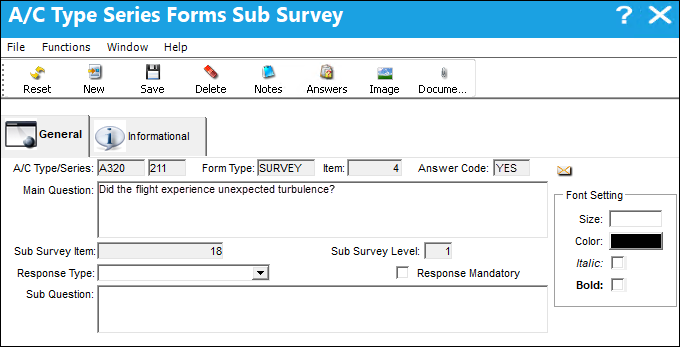
The following information/options are available in this window:
_____________________________________________________________________________________
A/C Types/Series
The Aircraft Type and Series/Fleet assignment.
Form Type
The user defined purpose of the survey form (e.g, Fluids, Bird Strike).
Item
The question number/ID.
Answer Code
The answer selected from the previous question; the initiator of the sub-survey question.
Main Question
The survey question that this sub-survey question was initiated from.
Sub Survey Item
The question number/ID.
Sub Survey Level
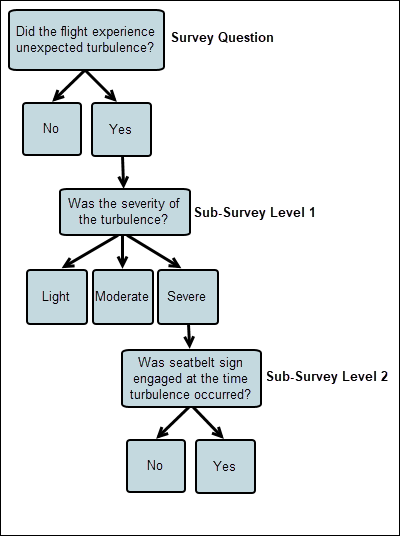
Indicates, by number, the hierarchy level of the sub-survey question. If an additional sub-survey question is set up under level 1, the next sub-survey level will be 2, etc.
Response Type
This determines the functionality and the type of response that is acceptable for the question. For more information on the available Response Types, refer to A/C Type Series Forms Survey, General Tab.
Response Mandatory
Select this checkbox if the response is mandatory.
Sub Questions
The question that will appear to the user in the survey.
Font Setting
- Size - Apply font size to text.
- Color - Apply font color to text.
- Italic - Apply italicized font to text.
- Bold - Apply bold font to text.
_____________________________________________________________________________________
Below is an example how sub-survey questions could be structured.
Share
Print
|
©1997-2026 Trax USA Corp. All rights reserved. This manual may not be copied, photocopied, reproduced, translated, or converted to any electronic or machine-readable form, in whole or in part, without prior written approval from Trax USA Corp. |
 |