
 Share
Share
 Print
Print
|
|
|
|
|


Work Order Addbill, General Tab
The W/O Addbill, General tab is used to query for W/O Addbills based on the following search criteria. Enter any of the below search criteria to query for a desired W/O Addbill and select the Find  button.
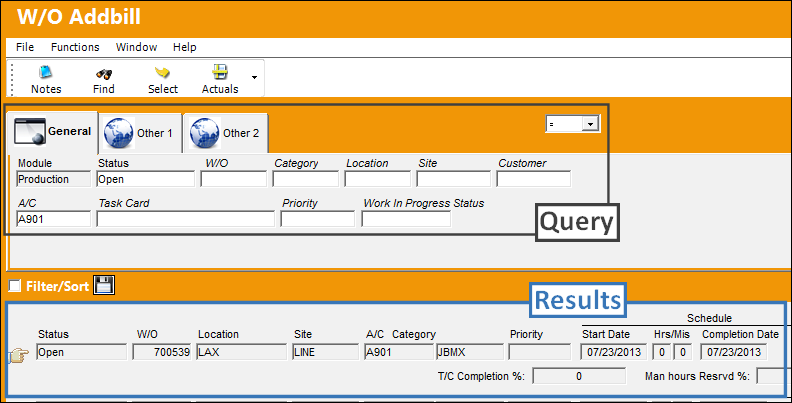
Select the Work Order to enter additional billing data for and click the Select  button.
The following window will appear:
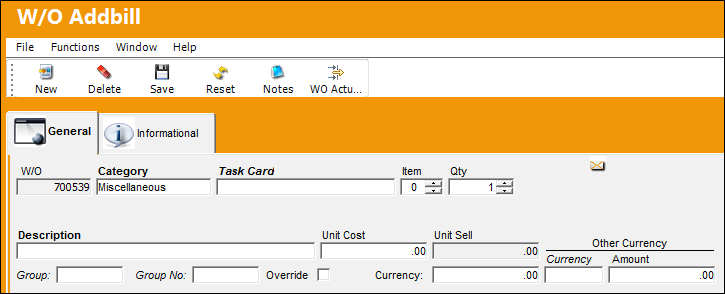
If an addbill is for a part, and the cost needs to be changed from the normal Sell cost, the OVR (Override) flag must be selected on.
These Addbill costs will show on an invoice if the Work Order is for a Third Party.
Auto Populate Unit Sell in W/O Addbill:
When the Group and Group Number fields are populated and the W/O Addbill window Save  button is selected, the Unit Sell field is automatically populated by the Group Number's Unit Sell amount.
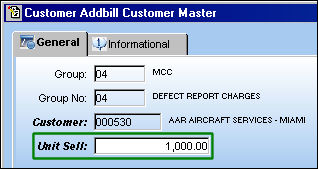
For example, notice the following Unit Sell amount (1,000.00) for the Group and Group Number via the Customer Addbill Customer Master window.
From the Work Order Addbill detail window, the same Group and Group Number have been entered.
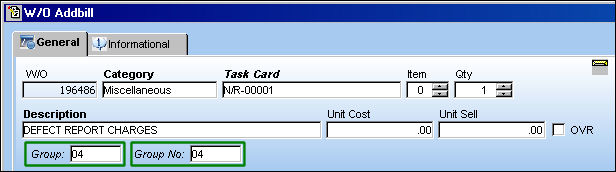
Once the the Save button is selected, the Unit Sell amount is automatically populated (1,000.00).
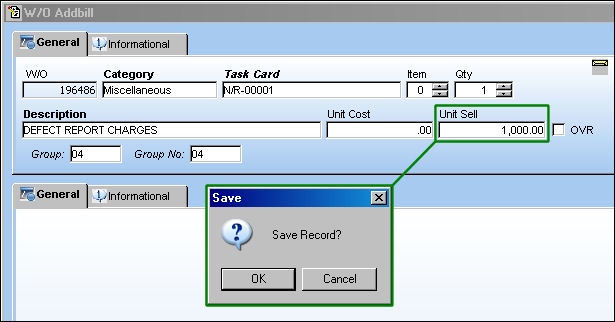
The Unit Sell amount can be changed to a number greater than '0' after the window is saved. If the Unit Sell is changed to '0', the original price will be reverted.
For more information refer to the Group Number Button, Via Customer Addbill Master Buttons of the Production Training Manual.
Share
Print
|
©1997-2026 Trax USA Corp. All rights reserved. This manual may not be copied, photocopied, reproduced, translated, or converted to any electronic or machine-readable form, in whole or in part, without prior written approval from Trax USA Corp. |
 |