
 Share
Share
 Print
Print
|
|
|
|
|


The TRAXDOC Editor uses uploaded Stylesheets in TraxDoc as a template for a print. The Task Card print layout can be defined by a TraxDoc Stylesheet. Task Cards of each TraxDoc can have a different layout based on the criteria of the TraxDoc (i.e. fleet type, customer). TraxDoc allows the user to modify Task Cards using Style Sheets. The TRAXDOC Editor is not a RTF Editor.
Go to Engineering/Update/Task Card.
Select the New  button. Populate all mandatory Task Card information in the General Tab.
Please see the NONE Editor for more information on the General Tab.
Select the Optional 1 Tab and confirm that the desired Editor (i.e. TRAXDOC) is selected before saving the Task Card.
TRAXDOC is the only Editor in which the TraxDoc No field appears when selecting the TRAXDOC option.
The user cannot save the Editor until a Traxdoc No is entered. Right click in the TraxDoc No field and select a number. The TraxDoc Number entered/selected must contain a Stylesheet saved against the TraxDoc number for the user to be able to view the TraxDoc data.
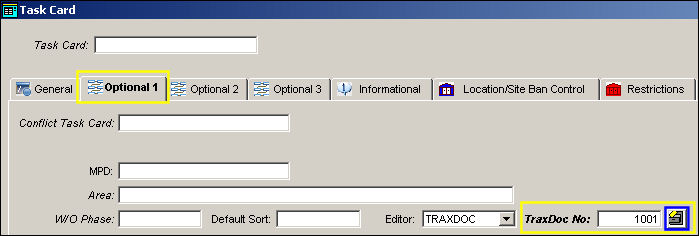
Select the Save  button. The Editor field will be grayed out, therefore locking the Editor selection.
Go to Engineering/Update/Task Card/Task Card Item.
When the TRAXDOC Editor is selected, the Task Card Item Window will appear as shown below. Enter the appropriate Task Card item instructions. Select the Skills Tab and populate all mandatory information. Select the Save button. The Save Prompt will appear. Select OK.
For more information on the above instructions, please see the NONE Editor.
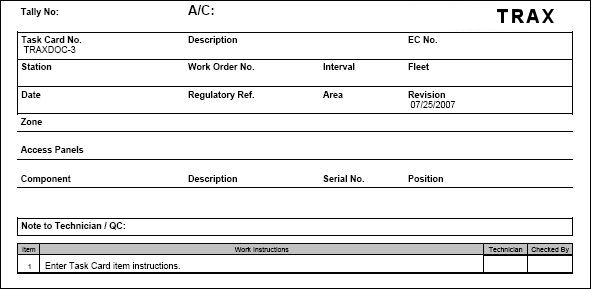
Repeat above instructions as needed to create multiple Task Card items. Select the Print  button to view the Task Card template.
TRAX displays the following Task Card template:
Share
Print
|
©1997-2026 Trax USA Corp. All rights reserved. This manual may not be copied, photocopied, reproduced, translated, or converted to any electronic or machine-readable form, in whole or in part, without prior written approval from Trax USA Corp. |
 |