
 Share
Share
 Print
Print
|
|
|
|
|


Task Card Shop, Optional 1 Tab
The Task Card, Optional 1 tab allows the user to add the following optional information to the Task Card:
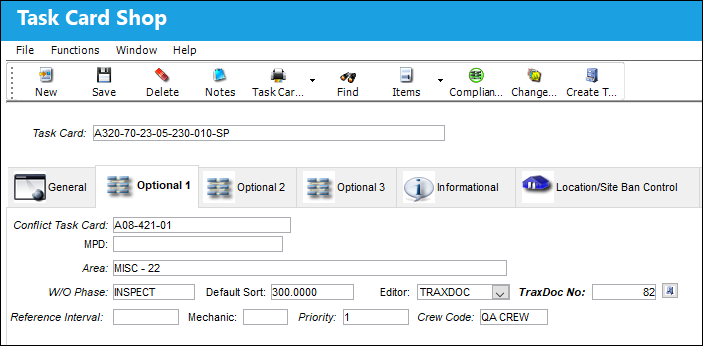
The following information/options are available in this window:
_____________________________________________________________________________________
Conflict Task Card
If a Task Card is specified here, it indicates that the current Task Card should not be performed should it appear in a Work Order with the specified Task Card.
MPD
The Maintenance Planning Document reference for this Task Card.
Area
The Area of the aircraft which this Task Card is related to, as defined in the Trans Code.
Work Order Phase
The phase of the Work Order on which the Task Card work is carried out on.
Default Sort
The default sort priority of this Task Card when it is printed on a Work Order.
Editor
The application that will be used to edit the Task Card information. The application will also be used to edit Task Cards when those Task Cards are placed on Work Orders via Production/Update/Work Order. Selectable formats include: Word ®, TASKCARD, or the default Powerbuilder ® RTF (i.e. NONE). This is a customized layout for the Task Card.
Using the Editor drop-list on the Optional 1 Tab of the Task Card, the user can choose the editor that will be used to edit each Task Card Item (Step) on an individual basis. The user may set the value for all new Task Cards with the following configuration switch.
Reference Interval
The Task Card / Non-Routine Task Card reference interval is the schedule for this work requirement. This is an informational field and the schedule is derived from the E/C that the Task Card is associated to.
Mechanic
The number of mechanics needed to complete this task. This is informational only.
Priority
The priority of the Task Card (e.g., Normal, Urgent).
Crew Code
Any crew code associated with the Task Card.
_____________________________________________________________________________________
Share
Print
|
©1997-2026 Trax USA Corp. All rights reserved. This manual may not be copied, photocopied, reproduced, translated, or converted to any electronic or machine-readable form, in whole or in part, without prior written approval from Trax USA Corp. |
 |