
 Share
Share
 Print
Print
|
|
|
|
|


Manual Revision Recording Detail, General Tab
Permanent revisions to Manuals are performed using the same procedure as temporary revisions.
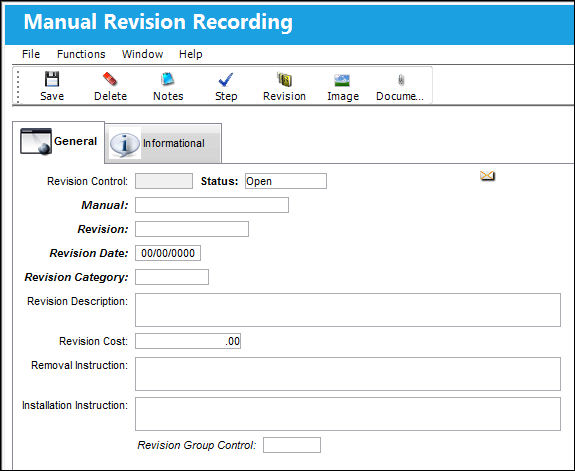
The following information/options are available in this window:
_____________________________________________________________________________________
Revision Control
This number is automatically created by the system upon saving the record.
Status
Choose Open when creating a new Revision Recording.
Manual
The manual to be revised.
Revision
The revision of the manual, according to the manual's manufacturer.
Revision Date
The date of the revision of this Manual.
Revision Category
The manuals revision category.
Revision Description
A description of the Revision.
Revision Cost
Any cost associated with the revision.
Removal Instruction
Specific removal instructions related to the Manual.
Installation Instruction
Specific installation instructions related to the Manual.
Revision Group Control
If this manual is controlled by Revision Group Control, enter the appropriate code from the drop-down menu. For more information about the Revision Group Control please refer to the chapter ‘Manual Revision Recording, Temporary and Permanent Revisions’ in this manual.
_____________________________________________________________________________________
Share
Print
|
©1997-2026 Trax USA Corp. All rights reserved. This manual may not be copied, photocopied, reproduced, translated, or converted to any electronic or machine-readable form, in whole or in part, without prior written approval from Trax USA Corp. |
 |