
 Share
Share
 Print
Print
|
|
|
|
|


Customer Invoice Authorization Invoice
From the Customer Invoice Authorization window, the user can right-click on any invoice and access the Customer Invoice Authorization Invoice window. From this window, the user has a number of options to select regarding the invoice such as canceling an invoice, posting and closing an invoice and other such transactions.
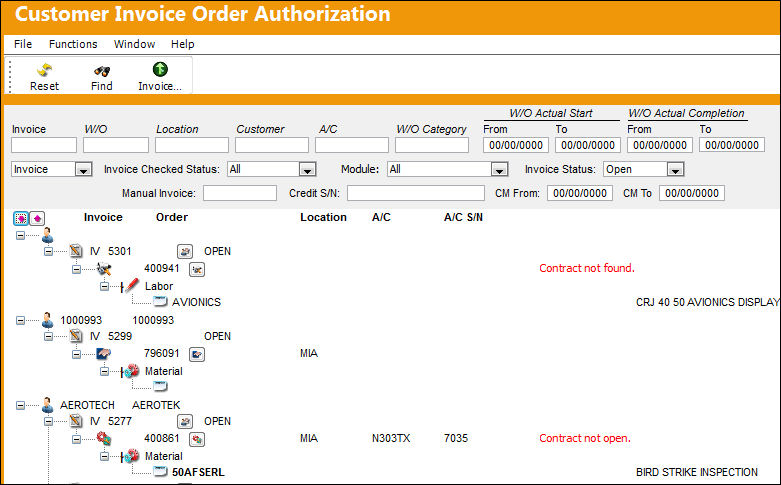
TRAX displays the Customer Invoice Authorization Invoice window.
This window displays any and all items for this invoice including any invoices and Work Orders that were merged onto this invoice.
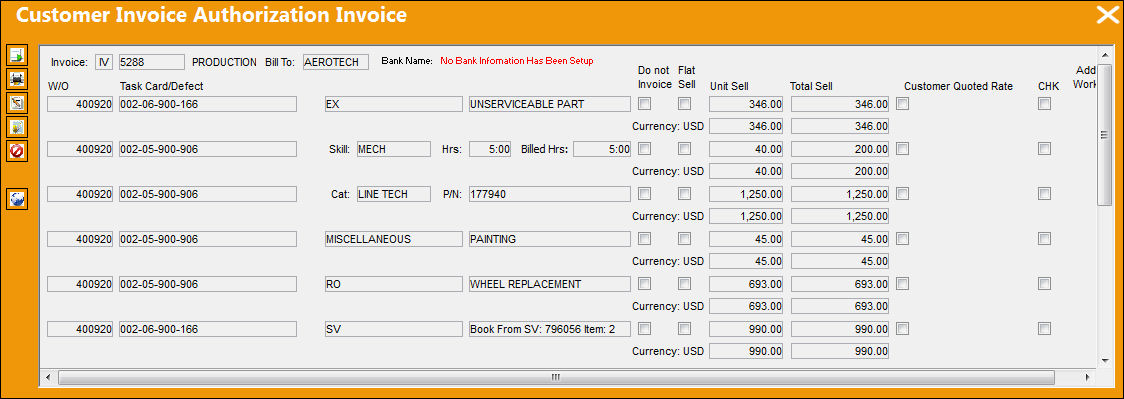
The following information/options are available in this window:
_____________________________________________________________________________________
Invoice
The Invoice requiring authorization.
W/O
The Work Order used to categorize, manage, and schedule work requirements for aircraft maintenance.
Task Card
The Task Card / Job Card that details the scheduled maintenance work.
Cat
The Category Code.
P/N
The Part Number reference for the aircraft part.
Order Type
The order type (RO, EX, RN, and SO).
Skill
The skill used to perform the labor.
Hrs
Actuals number of hours to complete the labor.
Billed Hours
The number of hours/minutes the customer was billed for.
Do Not Invoice checkbox
When selected, the material or labor specified will be displayed in the invoice, but the customer will not be charged for the material or labor specified. (For example, this could include materials such as gloves, or labor such as cleaning of an aircraft that should be listed in the invoice but the customer may not be required to pay for.) For additional information, refer to Do Not Invoice Checkbox.
Flat Sell checkbox
This is the flat chargeable amount for material and or labor. Flat rate is in company currency. This checkbox appears only when the Do Not Invoice checkbox is deselected.
Unit Sell
The Sell price per each unit.
Total Sell
The total Sell amount for all units.
Customer Quoted Rate checkbox
This checkbox is selected when a customer is quoted in customer currency per contract. This checkbox cannot be overridden from this window, therefore must be defined in the customer contract, if required. When this checkbox is selected, the Customer Quoted field will appear. For additional information, refer to the Customer Quoted Rate.
Grand Total
The total of all charged line items.
Currency 
The Customer's currency which triggers the exchange rate. This field is informational.
The Unit and Total Sell for the Currency set in the Customer Master will automatically populate based on the exchange rate at the time of the posting.
_____________________________________________________________________________________
The following buttons are available for additional functionality:
- Post And Close Invoice button
- Invoice Header button

- Invoice Cancel button
- Re-Open Posted Invoice button
- Credit Memo button

- Customer Invoice Authorization Other button
Share
Print
|
©1997-2026 Trax USA Corp. All rights reserved. This manual may not be copied, photocopied, reproduced, translated, or converted to any electronic or machine-readable form, in whole or in part, without prior written approval from Trax USA Corp. |
 |